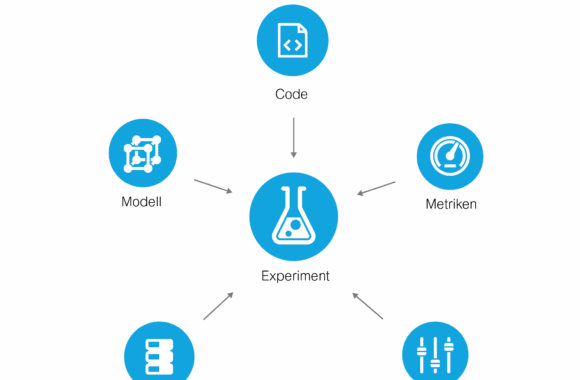
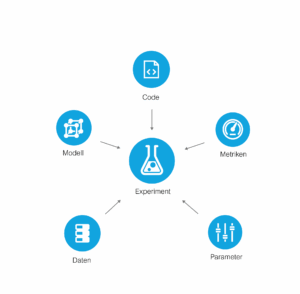
In addition to the code, models, data sets, parameters and metrics must also be saved, which can be adapted or changed during the course of the project. In order to reproduce an experiment, all artifacts must be versioned correctly. And this can be more problematic than it initially sounds.
There are usually repositories on GitHub, GitLab or Azure DevOps for the central storage and organization of code. However, they quickly reach their limits when storing data sets or model artifacts, as these are often larger than the file limit of 60-100 MB. Although there are extensions to save these special cases, parameters and metrics can theoretically be saved as a note in the code script or as a separate text file. However, this method is not practical and is prone to human error, especially if there are several participants in the project.
Wouldn't it be nice if you could use a platform that works similar to GitHub, but is more optimized for data projects? This is exactly where DagsHub into play.
DagsHub is a platform for data scientists and machine learning engineers to version data, models, experiments and code.
It enables the management of repositories and is very similar to GitHub. However, DagsHub offers additional tabs such as Experiments, Data, Models, Notebooks, DVC and Git.
Important tools for tracking machine learning (ML) experiments can be integrated on the platform. This makes collaboration in data projects much easier. Use is free for up to three people. For four or more people, a subscription will be charged[1].
In this article, we would like to introduce DagsHub and provide an introduction to using this GitHub equivalent with MLflow and Data Version Control (DVC). Both are open source tools that enable the versioning of artifacts and the tracking of training experiments. Using an example, we show how even larger teams can effectively manage their data projects without expensive licensed products.
Setting up a repository on DagsHub
To use DagsHub, we first need to register and set up a repository, either by creating a new one or connecting an existing one to the platform.
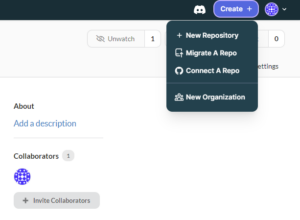
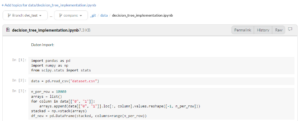
Once we have set up the repository, we can view the content, similar to GitHub. However, there are some noticeable differences, such as extra tabs for data sets, models and notebooks. The good thing is that, unlike GitHub, we can read and comment on Jupyter Notebooks directly on the platform. The respective artifacts end up in the other tabs as soon as we version them with Git or DVC. How the versioning of code with Git works can be here can be read here. For this article, we would like to leave out an explanation, which is why we are jumping straight to the versioning of large files with DVC.
Versioning of data sets and models with DVC
Data sets and model files can quickly exceed the volume limit of Git. However, these artifacts also need to be shared and managed within the team. DVC provides a remedy here by enabling the storage and tracking of large binary data.
DVC is installed using the pip package manager:
pip install dvc
In the local repository we have to initialize DVC with :
dvc init
Usually, it is necessary to register an external storage such as Google Drive, Amazon S3, Azure Blob Storage or Google Cloud Storage after installation. However, DagsHub makes this process easier by providing each repository with a storage space. We can find the URL for this storage space in the repository view under the remote button:
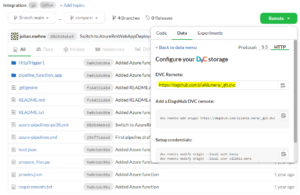
We define the remote memory for DVC as follows:
dvc remote add origin
Now we need to add the authentication for the storage:
dvc remote modify origin --local auth basic
dvc remote modify origin --local user DAGSHUB_USERNAME
dvc remote modify origin --local password DAGSHUB_PASSWORT
Next, we add a data set that we want to save on DagsHub. To add the directory data/vibration we need to execute the following command line command:
dvc add data/vibration
This command creates a new .dvc file. This is a small text file that contains information (hash values). The hash values show a kind of encrypted path to the original file. This allows us to access the original file on our memory. At the same time, the data set is added to the .gitignore so that it is not versioned by Git.
data
├── vibration
│ └── mfpt_small.csv
└── mfpt_small.dvc
The actual data set is uploaded to the DagsHub storage with a push:
dvc push
We now have the option of making changes to both the data and the code, committing them and publishing the changes to Git:
git add data/vibration
git commit -m 'push data and code'
git push origin master
On GitHub we can download the .dvc-files, but not the data itself. This is because the actual data is stored on DagsHub. On DagsHub we can view both the .dvc-files as well as the data itself.
This feature is extremely useful as we can now view both the code and the data on a single platform.
In contrast to GitHub, we can not only view code scripts on DagsHub, but also Jupyter Notebooks. Since notebooks are very popular with data scientists due to their interactivity, this offers a real advantage.
Logging experiments with MLflow
The Python library MLflow enables data scientists to track their experiments together with models and parameters. However, it does not track the code itself.
DagsHub, on the other hand, makes it possible to clearly assign experiments to a code status. On the "Experiments" tab, we get a list of these experiments:
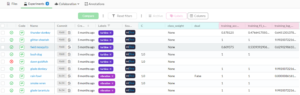
It is common practice to log all executions of experiments with MLflow, but not to version the code each time. Only the code that leads to useful results should be uploaded to the repository. For MLflow experiments, however, it is not possible to identify the code used. DagsHub automatically creates a link between the experiments and the corresponding code. In the "Experiments" view, we can assign a unique code status to each experiment via the "Commit" tab.
The following demonstrates how MLflow is used to record experiments.
MLflow is installed using the pip package manager:
pip install mlflow
To track experiments, we need an MLflow server on which the logs are stored. Often the local computer is used as a server, but this means that teammates do not have access to the logs. DagsHub offers a solution to this by providing a server specifically set up for the repository. The URI for this server can be found in the repository view under the "Remote" button:
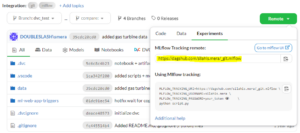
We set the URI in the code before training the model. We then name the experiment and optionally set whether certain parameters and metrics should be logged. Autolog records some standard parameters and metrics.
mlflow.set_tracking_uri("https://dagshub.com/silahis.mera/_git.mlflow")mlflow.set_experiment("decision-tree")
mlflow.autolog()
x_train, x_test, y_train, y_test = train_test_split(data, labels, random_state=21, test_size=0.30)
clf = DecisionTreeClassifier(random_state=21)
clf.fit(x_train, y_train)
That's it! From now on, every time we run the code, the parameters and metrics for each experiment will be displayed in the "Experiments" tab in the DagsHub repository.
Since we now log the MLflow experiments on a central server instead of a local database, teammates can access the experiments via their browser.
Comparison between MLflow experiments
If there are a large number of experiments, team members can easily lose track. To find the best run, there is the option of comparing experiments. To do this, we click on the boxes of all the experiments we want to compare in the "Experiments" view and then click on "Compare".
All selected experiments are then presented in a comparison:
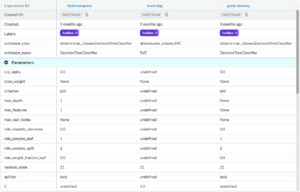
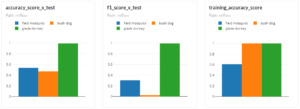
Charts can also be created to display the evaluation metrics in order to visualize the results at a glance:
My conclusion: Better collaboration in data projects thanks to open source tools
DagsHub is a user-friendly alternative to GitHub that offers some significant advantages, especially for data projects. By combining GitHub, DVC and MLflow, all requirements for traceability and reproduction of experiments can be met. Particularly useful are the DVC storage and MLflow servers that come with each repository and save setup effort. The notebook view and experiment comparisons are further extras that users will no longer want to do without.
Usability should not be a problem for most machine learning engineers, as MLflow is already part of the tech stack and DVC uses the syntax of Git. The only hurdle would be the price: DagsHub is free for teams of up to three people, but there are subscription costs for teams of four or more. [1]
Overall, the platform improves the development process within the team in terms of time and administration. Whether the benefits outweigh the costs depends on the individual case. In any case, MLflow and DVC can be used free of charge as pure open source tools, even without DagsHub.
[1] https://dagshub.com/pricing ^