
Every incoming electronic document usually requires an initial review by its employee in order to determine the internal responsibility. Similarly, the department responsible for the document must respond before it can understand the document's purpose and process it accordingly.
This process could be optimized by automatically assigning incoming documents to the correct department (e.g. HR department) or at least to a specific department. Document class (e.g. application) can be assigned.
As part of my bachelor thesis, I developed a system for classifying electronic documents.
This involves the use of Layout and text analysis is used to determine which document belongs to a given document class (e.g. application, reminder, invoice, etc.). Based on this classification, the first step is to create a reliable Recognition of applications are made possible. Manually generated expert knowledge provides a wealth of information about the expected structure and content of common application letters.
An example: The sender address is located at the top left, contains several lines of text, an address, e-mail address(es) and telephone number(s) if applicable. However, other document classes can also be modeled flexibly and with little effort for an analysis.
In this article I describe the methods and the procedure for creating my classification.
In the first step, the geometric layout analysis provides information about the division (segmentation) of each document page into homogeneous, visually coherent regions. Image analysis approaches are used here, but these require each document page to be converted into its graphical representation. The framework PDFBox[1] provides functionalities for carrying out the required Rendering process ready. Based on this, the sequential application of several image filters of the framework enables JavaCV[2], the qualitative processing of each graphical representation. JavaCV also has contour recognition procedures for identifying important areas of a document page.
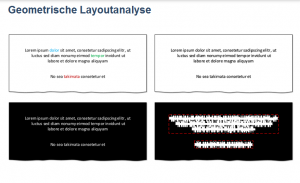
The geometric layout analysis is an important basis for subsequent analysis procedures. Incorrect segmentation can therefore have a negative impact on classification. However, this problem can be greatly counteracted by continuously optimizing the segmentation in subsequent analysis procedures. For example, if a large text area of the document page has been divided into several independent segments, these can be merged during the logical layout analysis.
In the second step, these segments are included in the logical layout analysis. The aim of this process is to assign a logical meaning (e.g. title, text body, date, etc.) to each segment. Here, the program relies on manually generated knowledge (previously created by the user) in the form of Document definitions are used. Document definitions describe the expected structure and content of documents in a document class.
Three possible document definitions are visualized below to model the structure of an application letter. For the sake of simplicity, the expected content is not discussed here.
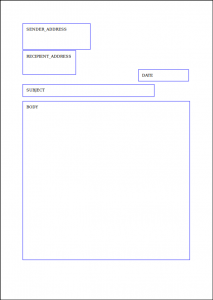
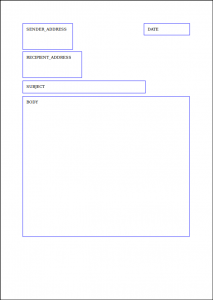
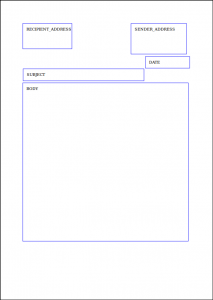
By combining different Distance dimensions can also be used to decide which document definition of the given document class achieves the best match with a real document page.
The final step is the processing of all segments by applying multilingual NLP (Natural Language Processing) Process. NLP methods are used to process "natural" languages that are spoken and written down by people. Depending on the language used by the framework Apache Stanbol[3], different NLP methods are used, which the framework Apache Lucene[4] is available.
The following NLP procedures were implemented:

1. tokenization: splitting continuous text into its components (tokens)
Example: Application for a permanent position. → [ Application, for, a, permanent, position, .]
2. stopword filtering: removal of "unimportant" words
Example: [ Application, for, a, permanent, position, . ] → [ Application, permanent position ]
3. stemming: tracing each word back to its root. This process allows similar words to be traced back to the same root word.
can be traced back. The resulting word stem does not necessarily have to be found in a dictionary.
Example: [ Application, Applications, Applicant, apply ] → apply
The actual classification ultimately results from the termination conditions of each analysis procedure. If, for example, no segments can be identified during the geometric layout analysis, this procedure fails and the document page is skipped. Only when a document page passes through all analysis procedures without a termination condition is it classified accordingly.
If a document has been positively classified, a final Information extraction. This can be done within the document definitions using predefined Output strategies can be flexibly configured by the user. Extracted MetadataThe data, such as telephone numbers, e-mail addresses or keywords, are stored in a text file and are then available for further processing by the user.
Example
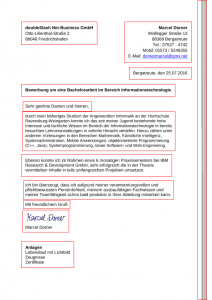
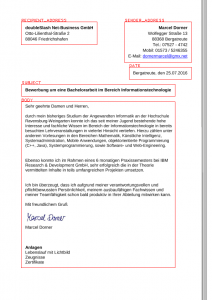
Even without highly complex artificial intelligence algorithms, the classification of any documents can be accomplished. Although the efficiency of the method presented here depends, among other things, on the manually generated knowledge base (document definitions), it does not require a time-consuming training phase with countless similar documents compared to algorithms capable of learning. Whether complex or simple algorithms: Increasing digitization must be reacted to accordingly. Depending on the application, less can sometimes be more.
[1] https://pdfbox.apache.org
[2] https://github.com/bytedeco/javacv
[3] https://stanbol.apache.org
[4] https://lucene.apache.org