
Sending files by email is part of everyday life in many companies. Unfortunately, this is often done without password protection or an expiration date. Our new Outlook Web Add-in provides a solution: it uploads files directly from Outlook to the Business Filemanager, protects them, and automatically sends a secure download link—including all compliance information.
Why we completely redesigned our add-in
Our classic COM add-in could already do a lot: upload files directly from Outlook to Business Filemanager and share them securely—but only on Windows desktops. Outlook on the web or on Mac was left out. Today, Microsoft relies on web technologies—and so do we. That's why we've redesigned the add-in: with React, modern Office API, and cross-platform support for browsers, Windows, and macOS.
This is what the new Outlook add-in can do
- Upload directly from Outlook: Select files, upload, done—even multiple files at once using the file dialog.
- Automated policy enforcement: Before sending, the add-in reads the selected options and automatically sets the corresponding permissions in Business File Manager, including access restrictions and expiration dates.
- Multilingual UI: The interface automatically adapts to the Outlook language – currently German and English.
- Single sign-on with Microsoft account: Thanks to the MSAL library and Azure AD, login is seamless—in most cases, no additional authentication is required because the Outlook session is already active.
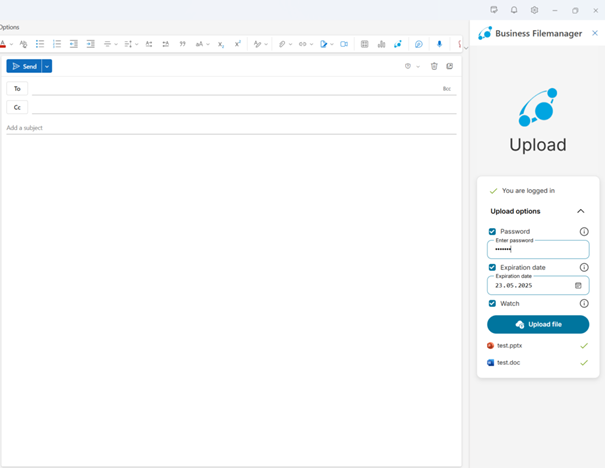
This is what the Outlook add-in looks like in action: Upload files, set a password, specify an expiration date—right in the email window.
Seamless integration into your existing infrastructure
The add-in is provided directly via the existing Business File Manager instance. It is installed there as a plugin – the static web files (HTML, JavaScript, CSS) are hosted by the File Manager server itself. This means that the add-in integrates fully into the existing infrastructure, eliminating the need for separate hosting or deployment solutions. Distribution within the company is handled centrally via the Microsoft 365 Admin Center. IT administrators can deploy the add-in there, and it will automatically appear for all authorized users without any local installation.
Conclusion: More Outlook, more security, more usability
Our new Outlook add-in is more than just a technological upgrade: it's a step toward better usability, higher security, and true platform independence. For everyone who uses Outlook every day—whether on the web, on a Mac, or in the desktop app. And best of all, integrating it into your existing infrastructure has never been easier.
Want to learn more? Then take a look at doubleSlash.de or find here Further interesting insights on the topic of file sharing.