What is Microsoft Azure IoT Central
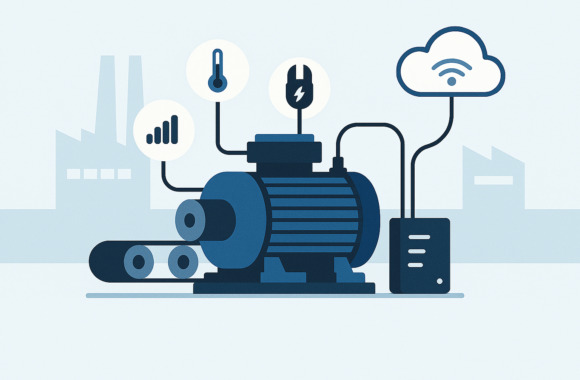
Microsoft Azure IoT Central is a Software-as-a-Service (SaaS) solutionwhich simplifies entry into the world of the Internet of Things (IoT). With IoT Central, initial experience with IoT projects can be gained in a short space of time and selected IoT use cases can be implemented for productive use.
IoT Central is a pure Cloud solutionwhich was developed exclusively for Microsoft Azure. An on-premise solution is currently not available.
IoT Central contains the classic IoT components of the Microsoft Azure Cloudsuch as Azure IoT Hub, Azure Time Series Insights or just Azure IoT Hub Device Provisioning Service (DPS). The SaaS solution is therefore based on very mature products.
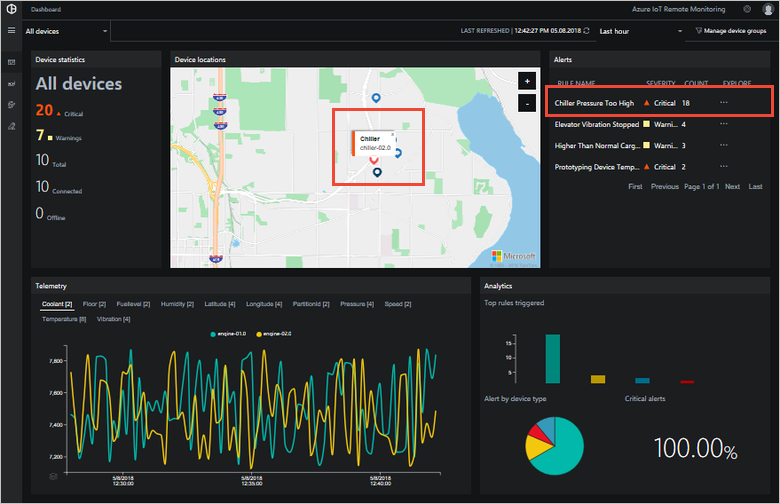
The options that IoT Central provides for mapping an IoT solution are completely sufficient for many projects. Incoming data is visualized and can be filtered. Specific measured values or events can be responded to in a wide variety of ways. From simple email notifications to the possibility of triggering other systems with webhooks (webhooks are interfaces that can address interfaces in other systems, for example), many scenarios can be implemented.
What distinguishes Azure IoT Central from a standard IoT project
A standard IoT project allows a very flexible selection of the components to be used, the development of your own architecture and a lot of leeway in deciding how the data is made available or processed. However, many questions need to be clarified:
- How does the data get into the cloud?
- If the data On-Premise or in the Cloud processed?
- How good is the Scalability?
- What about the Security and Reliability?
- How can devices and settings be managed?
These and other questions need to be carefully considered and answered in order to ensure a Reliable and sustainable IoT solution build up.
IoT Central allows you to skip this step and is provided at the touch of a button. This immediately enables Receive and visualize data, on Respond to data and to process further.
Source: https://docs.microsoft.com/de-de/azure/iot-central/concepts-architecture
How can IoT devices be connected to Azure IoT Central?
There is a solution for almost every conceivable scenario for connecting an IoT device to Azure IoT Central. IoT Central offers for many operating systems and programming environments SDKs for connection to IoT Central. In the special case that devices only have proprietary communication options, Azure IoT Edge, for example, can be used as a gateway for these systems.
The following Protocols are supported:
- AMQP
- MQTT
- HTTPS
If other more specific protocols are to be used, the following is suitable Azure IoT Edge for translating and establishing the connection.
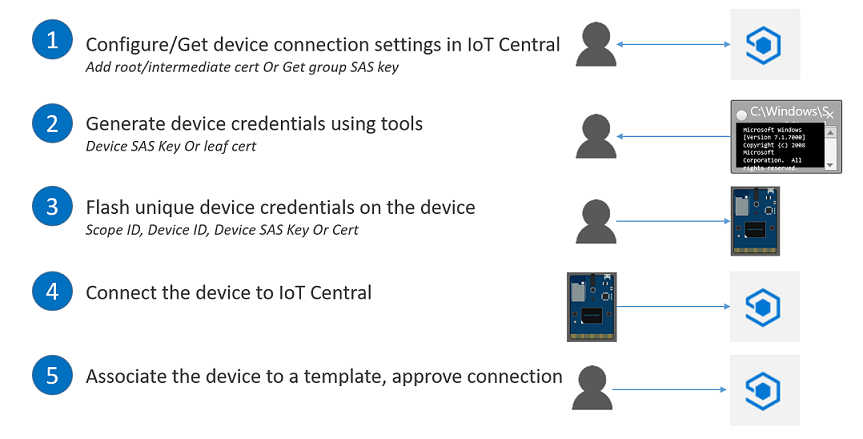
With the help of Azure IoT Hub Device Provisioning Service (DPS), IoT device connections can be Automated without the device having been registered beforehand. The device registers itself with the first Internet connection and obtains its settings and connection data.
Source: https://docs.microsoft.com/en-us/azure/iot-central/concepts-connectivity
How To: Get started with Azure IoT Central
One Azure Subscription is a prerequisite for Azure IoT Central. It is the basis on which billing will take place. IoT Central sees itself as Modeling-based IoT solution. In IoT Central therefore Each use case implemented as a separate application and the associated IoT devices are described as models. This means that all properties, settings, commands and metadata can be described individually.
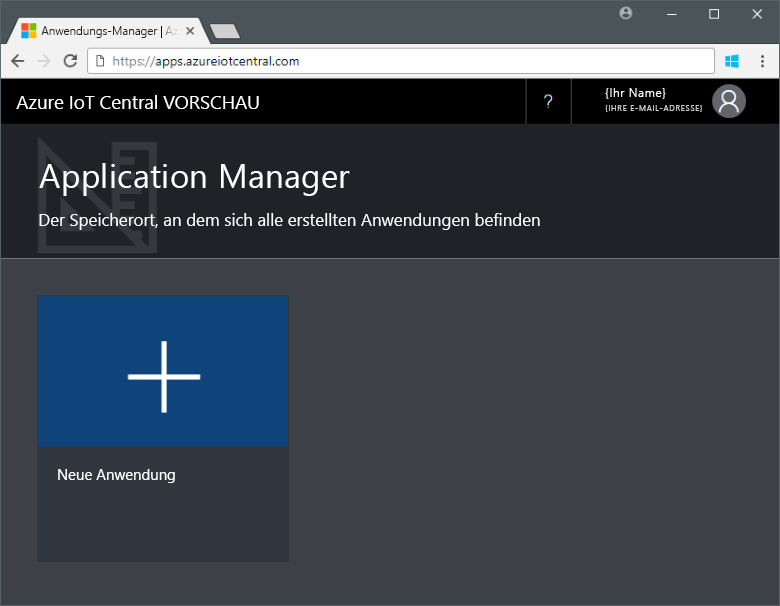
You can follow this link to start the first application: https://apps.azureiotcentral.com/.
To easily test IoT Central and take the first steps, the Contoso sample implementation can be used.
Source: https://docs.microsoft.com/en-us/azure/iot-central/concepts-connectivity
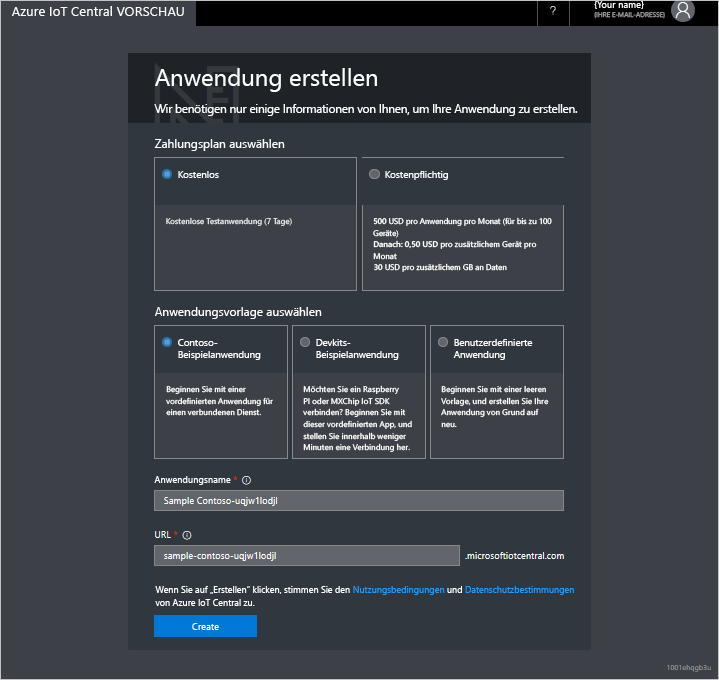
Basically, you have the choice between a Test period of 7 days or the "Pay as you go" variant. With the "Pay as you go" variant, the first five IoT devices with 50,000 messages each are "for free". Costs are incurred from the sixth device or if the number of messages is exceeded.
You can then choose from three options from which template the application should be created:
- The Contoso example implementation with simulated devices and ready-made dashboards
- With two finished Device templates for Raspberry PI and Windows 10 IoT
- One Empty application without specifications
Source: https://docs.microsoft.com/de-de/azure/iot-central/quick-deploy-iot-central
For a Proof of concept (PoC), option two is very suitable and saves a few minutes of work. If the application is to go live, it makes sense to create an empty application.
The Azure AD directory The subscription and the region in which the application is to be rolled out are selected.
Range of functions
With Azure IoT Central, you can quickly set up a Monitoring solution and to the Automated or semi-automated data response. For the management of IoT devices, Azure IoT Central offers convenient functions such as jobs that can be used to perform bulk operations.
- Descriptive device models for data and metatags as well as functions and settings
- Clear Customizable dashboards for devices and data
- Rule-based actions to data and status defined in the model
- Bulk Job for the management of device settings
- Organize devices in sets according to specific criteria
- Connection to other systems with e.g. webhooks
- Notifications
- Role-based authorizations
- Export the data
Connecting your IoT devices with the help of SDKs
For the Connection of IoT devices there are many ways. If it is possible to develop the connection independently, the following SDKs are available for support:
Azure IoT SDK for
- C
- Python
- Node.js
- Java
- .Net
More information: available SDKs
Azure IoT Central is a very suitable tool for Standard tasks in the IoT environment with the most common use cases. The set-up and one-time setup are Basic knowledge of the IoT easy to understand and simply designed. The Administration of the devices is very convenient and the Role-based model kills the most common requirements. All in all, IoT Central is certainly a very good start for PoCs and smaller projects. As soon as the number of devices reaches five figures or the requirements for customizability and functionality can no longer be met with it, there is no getting around a classic IoT project.
Implement your IoT project successfully with these tips
More blog posts on the topic of IoT:
IoT device management: what you need to consider
How do I choose the right IoT platform? (Part 1)
How do I choose the right IoT platform? (Part 2)