The cloud provider provides a free, but usually time-limited or functionally limited usage quota in order to create an incentive to use the cloud services offered. However, if this quota cannot (or can no longer) be used, costs are already incurred by the cloud provider during development without the application generating revenue at the same time. The use of real cloud services also requires an internet connection, which can have a negative impact on development in the event of unexpected internet outages, for example.
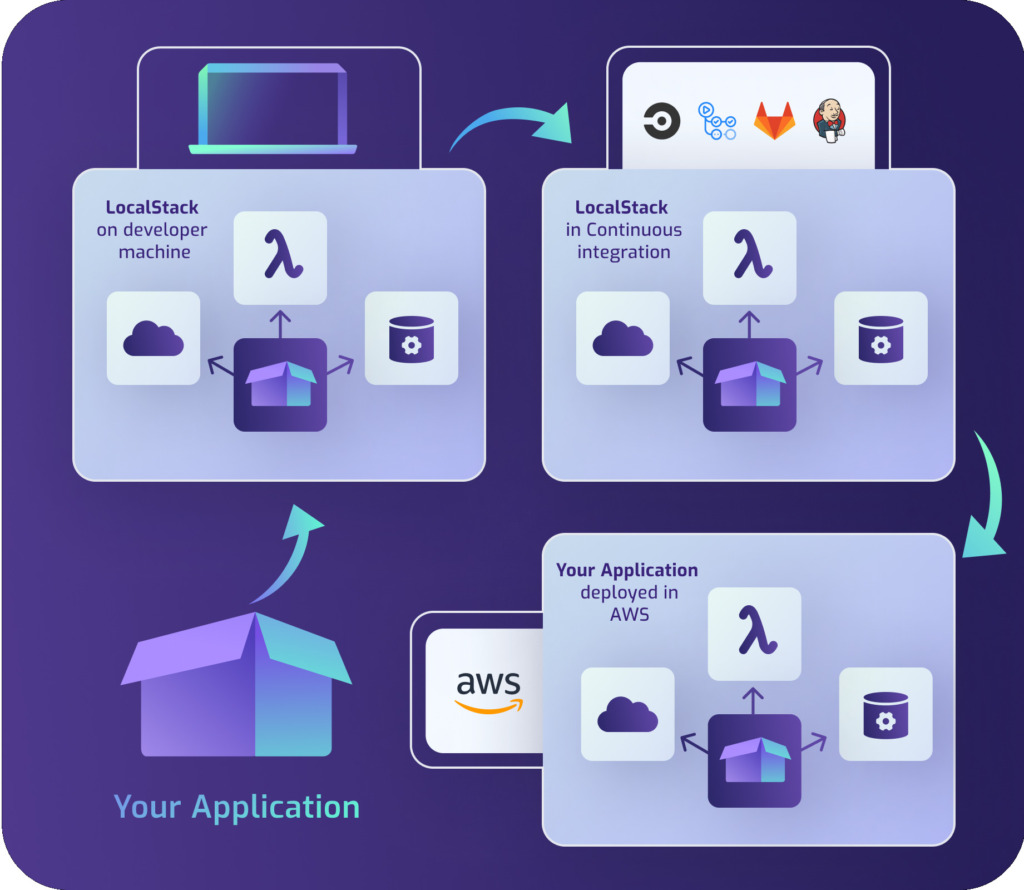
The mocking framework provides a remedy LocalStackwhich replicates or emulates a variety of AWS services. This minimizes the use of real services and eliminates the need for an internet connection. This is particularly advantageous for Continuous Integration (CI) environments. Here, for example, automated integration or load tests can produce large amounts of data without having to use real AWS services or "contaminate" them with test data. Once the test has been executed, the LocalStack environment can be reset as required to ensure a defined state for the next test execution. LocalStack is therefore a cost-effective, flexible and reliable solution for the local development and testing of cloud-based applications.
Feature Coverage
Feature Coverage gives developers a clear overview of which services are best suited to be used in their local environment. In the official documentation of LocalStack, the so-called Feature Coverage provides a detailed overview of the "maturity level" of the replicated AWS services. This overview not only shows the current Coverage Level services, ranging from "not implemented" to "fully supported", but also the Emulation levelwhich varies between static responses and full emulation.
Community vs. Pro version
If you use LocalStack, you should pay attention from the outset to which of the services offered are to be used in the long term, as some services are only available in the paid Pro version. You can find out whether a particular service is included in the free Community version or only in the paid Pro version on the following pages:
- Features
- Feature Coverage (see supplement Pro)
If the Pro or a higher version is required, you can download the latest Pricing model to select the right version for your needs.
Docker Compose
LocalStack can be configured and operated easily and effectively using Docker Compose. Referencing the official Docker Hub image localstack/localstack the configuration can look like this, for example:
Once the configuration is complete, the LocalStack environment can be started with the docker-compose up localstack command. As soon as all services are ready, they can be addressed by an application via http://localhost:4566.
In addition, the Cockpit Desktop UI (beta) can now be used to orchestrate a LocalStack environment using Docker and an appealing UI.
Porting
If Azure Cloud Services are to be used instead of AWS, Microsoft provides the following via Azurite provides a comparable solution that can also be operated using Docker Compose. However, there is currently no comparable alternative for the Google Cloud Platform.
Conclusion
LocalStack is a great solution to the challenges that can arise when developing cloud-based applications locally. It offers a variety of benefits such as emulating AWS services to minimize the use of real services, eliminating the need for an internet connection and providing a detailed overview of the "maturity level" of the emulated AWS services. Continuous Integration (CI) environments can also benefit from LocalStack as it enables automated testing with large amounts of data without the use of real AWS services. However, if certain AWS services are to be used in the long term, it is important to check whether they are only available in the paid Pro version. LocalStack can be easily configured and operated via Docker Compose and even offers a Cockpit Desktop UI (beta) for orchestrating LocalStack environments using Docker and an appealing UI.
Source:
1 https://localstack.cloud ^