
To Pact We would like to use a small, very simplified web store as an example. This consists of the backend services Inventory, Payment and Shipment and a front end, the Webshop. The webshop is the consumer here, the backend services are the providers.
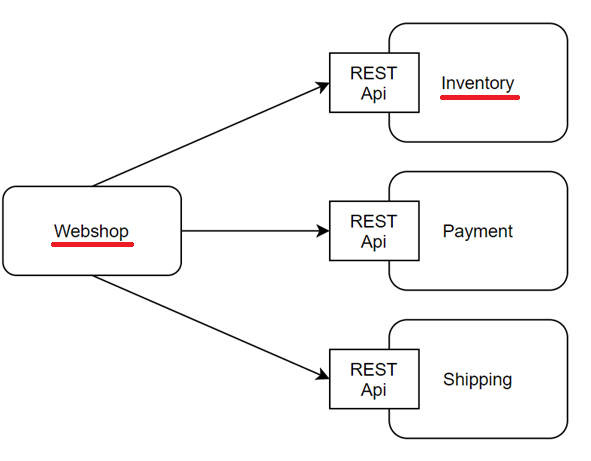
For this example, we consider the Inventoryservice and the webshop. The InventoryService provides the interface /items/{itemId} through which the web store can retrieve the information for a specific product. It expects a response in the following structure:
{
  "itemId": "phone_1",
  "name": "iPhone X",
  "description": "an ordinary phone",
  "price": 600.19,
  "currency": "EURO",
  "stock": 42,
  "imagePath": "/iPhoneXImage.png",
  "madeIn": "China",
  "availableSince": „2019-10-02“
}
Possible breaking API changes
Now it can happen that the provider changes its API without informing the consumer. Examples of this are
- The provider (inventory service) removes a field from the response that is required by consumers, e.g. the "description" field
Consequence: The consumer (webshop) needs this description, but now it is missing - Provider changes the URL of an endpoint or removes an endpoint used by the consumer, e.g.
/items/{itemId}→/product/{productId}
ConsequenceThe consumer no longer knows where to request the data at all - Provider changes the date format of a field, e.g. "availableSince":
yyyy-MM-dd→dd.MM.yyyy
Consequence: The consumer can no longer parse the date
It is precisely these possible sources of error that we are now going to analyze with the help of Contracts with Pact eliminate.
Definition of contracts on the consumer side (web store)
The contracts are defined on the consumer side. This is done as part of unit tests. Two things are required for this:
- The definition of a pact
- A test method for verifying the pact. If this test is successful, a pact file is automatically created and stored in the pact directory (e.g. target/pacts).
1. definition of a pact
We first define the expected Body with the help of the Pact-DSL. Here we have the option of specifying exact expected values (e.g. via "stringValue": exactly this string is expected) or only the expected datatype (e.g. "stringType": a string is expected). We can also specify an expected date format ("date").
We then build the pact. With "given" we can specify a provider state, which we will come back to later. We also specify the path, header, the expected response status and the expected body.
@Pact(provider = "inventory-service", consumer = "webshop-service")
public RequestResponsePact pactGetItemDetailsPhone3(final PactDslWithProvider builder)
      throws JsonProcessingException {

   // Values returned to consumer by mock provider are random if not specified by ...Value, e.g. stringValue
   final DslPart json = new PactDslJsonBody() //
         .stringType("itemId") // any String
         .stringValue("name", "Samsung Phone") // this specific String
         .stringType("description") //
         .numberType("price") // any Number
         .stringType("currency") //
         .integerType("stock") //
         .stringType("imagePath") //
         .stringType("madeIn") //
         .date("availableSince", "yyyy-MM-dd");

   final Map<String, String> requestHeaders = new HashMap<>();
   requestHeaders.put(HttpHeaders.ACCEPT, MediaType.APPLICATION_JSON_VALUE);

   return builder //
         .given("Item phone_3 exists") // "given" can be used to prepare provider state
         .uponReceiving("A GET request to /items/phone_3/") // "uponReceiving" is the description of the contract
         .path("/items/phone_3/") //
         .method("GET") //
         .headers(requestHeaders) //
         .willRespondWith() //
         .status(200) //
         .body(json) //
         .toPact();
}
2. verification of the pact
A test method is also required to verify the pact. About the annotation @PactVerification specifies the method that defines the pact to be verified.
During the execution of the unit tests, the Pact framework sends the request defined in the Pact to a mock provider. Corresponding assertions can then be carried out. If the test is successful, the Pact file is created.
@Test
@PactVerification(fragment = "pactGetItemDetailsPhone3")
public void verifyPactGetItemDetailsPhone3() {

   // arrange
   final HttpEntity requestHeaders = buildRequestHeadersAcceptApplicationJson();

   // act
   final ResponseEntity<Item> response = new RestTemplate()
      .exchange(inventoryProviderMock.getUrl() + "/items/phone_3/", HttpMethod.GET, requestHeaders, Item.class);

   // assert
   assertEquals(response.getStatusCode().value(), 200);
   assertEquals("Samsung Phone", response.getBody().getName());
}
Exchange of the Pact file between consumer and provider
The pact file must now be passed to the provider so that they can check whether the API they have provided corresponds to the defined contracts. This can be done manually. In our example, however, a Pact-Broker to which the consumer uploads the pact files. For this purpose, the command mvn pact:publish is used. The provider collects the pacts from the broker. This means that the pacts no longer have to be exchanged manually and the entire process can be automated.
Another advantage of the Pact broker is that the provider can send the results of its verification back to it. The consumer can then retrieve from there whether the provider's APIs correspond to the contracts and whether it can be deployed itself.
Verification of the provider's API with Pact
Verification on the provider side is largely automated. We provide a test class to define basic settings. The annotation @PactBroker The address of the Pact broker from which the Pact files can be retrieved is specified in the
The tests themselves are generated on the basis of the Pact file and executed automatically during the unit test phase. The Pact framework simulates a consumer that sends the requests defined in the Pact to the provider and checks whether the responses correspond to the expected responses. Only when all tests are successful is it certain that the provider's API meets the consumer's expectations and only then can it be deployed. This means that no breaking API changes can be deployed.
@RunWith(PactRunner.class)
@Provider("inventory-service")
@PactBroker(host = "localhost", port = "80")
public class InventoryProviderTest {

   @TestTarget
   public final MockMvcTarget target = new MockMvcTarget();

   private static final Logger LOG = LoggerFactory.getLogger(InventoryProviderTest.class);
   private final ItemsApiController controller = new ItemsApiController();

   @Before
   public void before() {
      MockitoAnnotations.initMocks(this);
      target.setControllers(controller);
      System.setProperty("pact.verifier.publishResults", "true");
   }

   // ==========
   // Phone 1
   // ==========
   @State("Item phone_1 exists")
   public void statePhone1Exists() {
      // Phone 1 exists, do nothing
   }

   // ==========
   // Phone 2
   // ==========
   @State("Item phone_2 is created")
   public void statePhone2IsCreated() {

      // instead of creating a real Item, might use a mock service, test db or similar
      controller.createPhone2();
   }

   // ==========
   // Phone 3
   // ==========
   @State(value = "Item phone_3 exists", action = StateChangeAction.SETUP)
   public void createPhone3() {

      controller.createPhone3();

      final List<Item> allItems = controller.getItems().getBody();
      boolean phoneCreated = false;
      for (final Item item : allItems) {
         if (item.getItemId().equals("phone_3")) {
            phoneCreated = true;
         }
      }

      assertTrue(phoneCreated);
      LOG.info("Created phone 3");
   }

   @State(value = "Item phone_3 exists", action = StateChangeAction.TEARDOWN)
   public void deletePhone3() {

      controller.deletePhone3();

      final List<Item> allItems = controller.getItems().getBody();
      boolean phoneDeleted = true;
      for (final Item item : allItems) {
         if (item.getItemId().equals("phone_3")) {
            phoneDeleted = false;
         }
      }

      assertTrue(phoneDeleted);
      LOG.info("Deleted phone 3");
   }
}
Provider States
Earlier we saw that we can define so-called "provider states" in the pacts ("given" when creating the pacts). These are used so that the provider can "set up" certain states for the tests: For example, an item can be created with which the test can be performed, or services can be mocked that return a mock item. Productive data does not then have to be used for tests, but the required test environment can be created.
Here in the example, we can see that nothing is done for the state "Item phone_1 exists". The item phone 1 already exists. Phone 2 is created for the state "Item phone_2 is created".
Phone 3 is created for the "Item phone_3 exists" state (action = StateChangeAction.SETUP) and deleted again after the test (action = StateChangeAction.TEARDOWN).
Any questions?
We look forward to your comments! :)