
At a time when the ability to find relevant information quickly and accurately is critical to business success, Apache Solr offers a powerful and scalable solution that goes far beyond the capabilities of traditional databases. In this blog post, we'll take a closer look at the special features of Solr and some of the pitfalls.
What is Apache Solr
Apache Solr is a powerful, open source search platform based on Apache Lucene.1 It was developed to efficiently search and index large volumes of text data. Solr impresses with its speed, reliability and ability to process complex search queries. Companies use Solr in a wide range of applications, from e-commerce websites to corporate intranets.
Special features
1. full text search and relevance assessment
Solr combines full-text search with a sophisticated relevance assessment. The Lucene index makes it possible to search documents quickly and deliver relevant results. This is done on the basis of factors such as term frequency and inverse document frequency (TF-IDF).
2. levenshtein distance and fuzzy search 2
With support for fuzzy search queries based on Levenshtein distance, Solr takes typos or similar search terms into account. This feature significantly improves the user experience by providing relevant results even if the search query is not exact. Different spellings of a term are therefore not a problem.
3. facet search
Solr offers a powerful faceted search. This allows users to filter and group search results according to different categories. This is particularly useful in e-commerce applications, as users can filter products by price, brand or other attributes.
4. distributed search and scalability
Solr supports distributed search and sharding. This allows large amounts of data to be processed efficiently across multiple servers. This feature makes Solr ideal for applications that require high scalability.
5. real-time indexing
Solr indexes data in real time so that new or updated information appears immediately in the search results. This is particularly important for news sites or social networks that require constantly updated data.
6. expandable plug-in architecture
With a flexible plugin architecture, Solr allows developers to extend functionality through custom plugins. This can include custom analyzers or special search functions.
Pitfalls
1. complexity of the configuration
The multitude of settings and parameters in Solr can be overwhelming for new users. Careful configuration is crucial to achieve optimal results.
2. resource intensity
Solr can be resource-intensive, especially when it comes to memory and CPU. As a result, insufficient hardware equipment can significantly impair performance, especially with large amounts of data or complex queries.
3. replication and consistency
While Solr provides excellent support for distributed systems, managing replication and consistency can be a challenge. It is important to find the right balance between read and write operations to ensure optimal performance.
Features of Solr
1. rich document handling
Solr supports a variety of document formats, including XML, JSON, CSV and binary formats such as PDF and Word. This versatility makes it possible to index and search a wide range of data sources. This allows organizations to consolidate their data into a unified search index, making it easier to manage and access information.
2. multilingual support
Solr offers extensive support for multilingual applications. With dedicated analyzers and tokenizers for different languages, Solr can meet the challenges of multilingual data processing. This is especially important for global organizations that operate in multiple markets and need to ensure that their search capabilities are accurate and effective in every language.
3. analyzer and filter
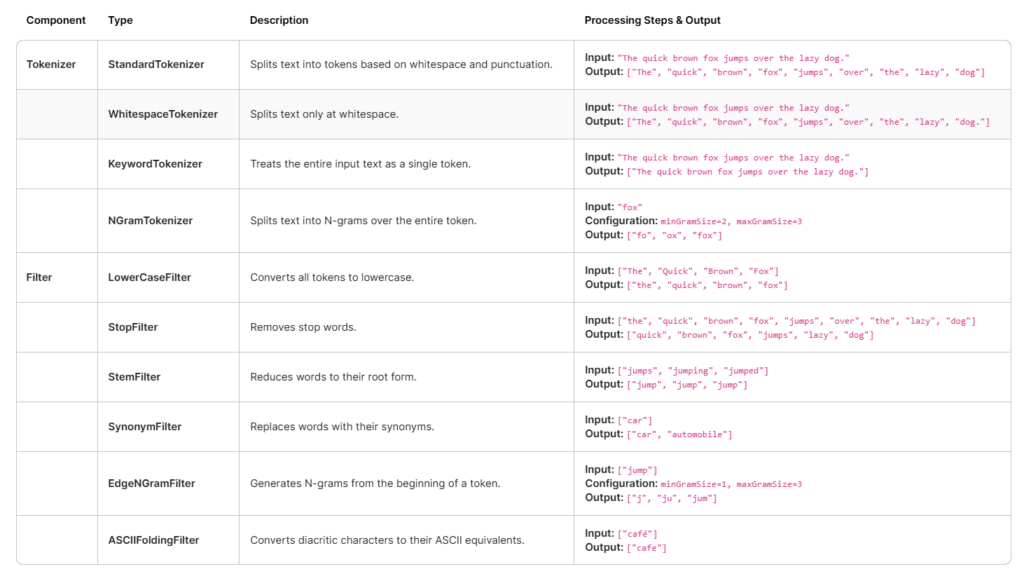
An analyzer is a component that processes text data in order to prepare it for indexing and searching. The analyzer breaks down the text into tokens (words or terms) and can further transform these tokens to improve search accuracy. They are crucial for natural language processing and handling text data in different formats and languages.
Important components of an analyzer
- TokenizerThe tokenizer is the first step in the analysis process. It breaks down the input text into individual tokens.
- FilterAfter tokenizing, the tokens pass through a series of filters that can perform various transformations. Filters can normalize, remove or transform tokens to improve search accuracy.
By combining tokenizers and filters, custom analyzers can be created to meet specific requirements, such as industry-specific terminology or multilingual data processing.
The following table lists some tokenizers and filters:
4. radius search
Proximity search (also known as geographic search or geo search) is a function that allows search results to be filtered based on geographical proximity to a specific point. This is particularly useful for applications such as local business searches, real estate portals or mobile applications that provide location-based information.
Implementation of the proximity search
- Save geodata: To enable radius searches, Solr stores the geographical data (latitude and longitude) and uses special fields such as
SpatialFieldorLatLonPointSpatialField. - Formulate search queries: In a radius search, a search query is formulated that specifies a center point (latitude and longitude) and a search radius. Solr then calculates the distance of each document from the center point and filters the results based on the specified radius.
- Sorting and filteringSearch results can be sorted by distance to display the closest results first. In addition, Solr offers the possibility to filter results within a certain range to display only relevant hits.
Example of a radius search
A typical example of a proximity search in Solr looks like this:
q=*:*&fq={!geofilt sfield=location pt=37.7749,-122.4194 d=10}
This example searches for all documents located within a 10-mile radius of the coordinates of San Francisco (37.7749, -122.4194).
Conclusion
Apache Solr is a versatile tool for implementing search and indexing functions in a variety of applications.3 Despite some challenges and pitfalls, the benefits and flexibility that Solr offers far outweigh them. For experienced users, Solr provides a robust platform that is customizable and scalable to meet the needs of modern applications. By taking the above points into consideration, you can realize the full potential of Solr and provide a first-class search experience for your users.