In today's data-driven world, comparing database IDEs is essential to find the optimal solution for developers and administrators who need to manage and optimize complex database structures. Whether relational or NoSQL databases, choosing the right IDE can significantly contribute to a team's efficiency and productivity.
In this article, we compare five popular database IDEs: DBeaver, JetBrains DataGrip, pgAdmin, Oracle SQL Developer and HeidiSQL. Each of these tools offers unique features and benefits that make them particularly suitable for certain use cases.
From the versatility and extensibility of DBeaver and the comprehensive functionality of DataGrip to the specialized support of PostgreSQL provided by pgAdmin, the powerful PL/SQL features of Oracle SQL Developer and the ease of use of HeidiSQL, we look at the similarities and special features of these tools to help you decide which solution is right for you.
There are certainly many other excellent tools that also fit your requirements well. If you know of an IDE that has not been mentioned here but you think deserves attention, or if you have feedback on the tools presented, please do not hesitate to contact us. We look forward to your suggestions and experiences!
What do all database IDEs have in common?
All of these database IDEs share some basic similarities: They are available across platforms, offer auto-completion for SQL and have query editors with syntax highlighting. They also support the management of multiple databases and offer secure connection options via SSH tunnels. All tools are compatible with cloud databases, making them attractive for modern development environments.
What are the differences between the individual database IDEs?
- DBeaver:1 This versatile IDE supports both relational and NoSQL databases and is available in a free Community Edition and an extended paid Enterprise Edition. DBeaver can be extended with plugins and offers comprehensive visual modeling of database schemas. Both the Pro and Community Editions (in a slimmed-down form) offer options for connecting and using AI models.
- JetBrains DataGrip:2 DataGrip is known for its strong performance and integration with version control systems such as Git and SVN. The IDE offers comprehensive query optimization tools and supports a variety of databases. It requires a paid subscription but offers a trial version. The Jetbrains AI Assistant (extended subscription) can also be connected.
- pgAdmin:3 As an open source tool specifically for PostgreSQL, pgAdmin provides a solid platform for the administration of PostgreSQL databases. It is available for free, but with limited features compared to commercial alternatives, especially in terms of visual modeling and advanced error checking. There is currently no option to connect AI models.
- Oracle SQL Developer:4 This IDE is specially optimized for Oracle databases and offers comprehensive support for PL/SQL development. SQL Developer is free, but not open source. It also offers good integration for Oracle Cloud services. Support for other relational databases is limited. An AI connection is currently not possible.
- HeidiSQL:5 Known for its ease of use, HeidiSQL is particularly suitable for MySQL and MariaDB users. It offers basic SQL functions and is open source and free of charge. Support for other databases such as PostgreSQL and SQL Server is available, but limited. An AI connection is not currently planned.
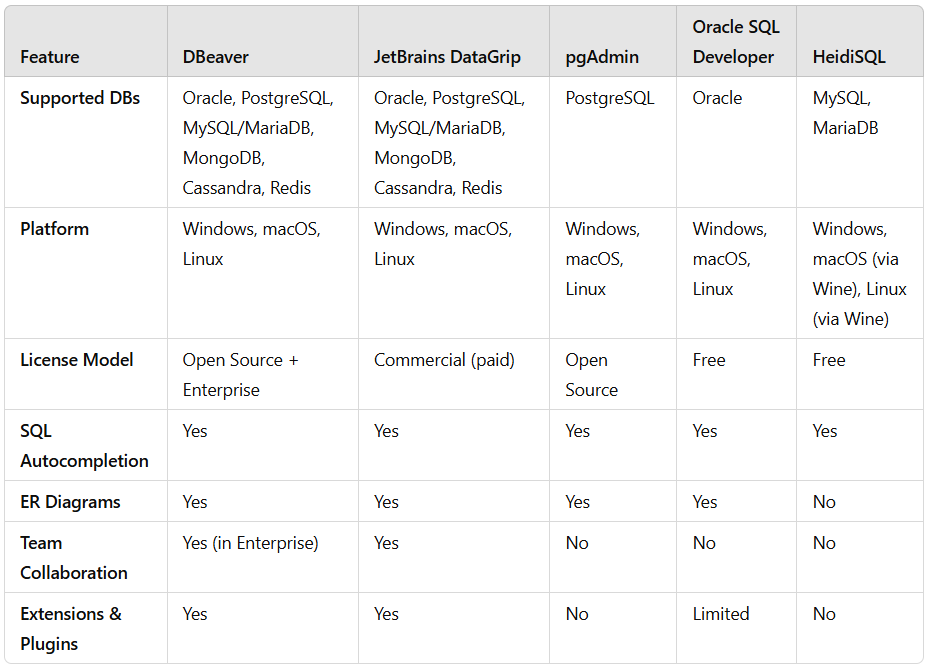
Comparison table of database IDEs
The following table shows an overview of the most important features.
Conclusion: Which database IDE is right for me?
The best SQL IDE depends on your own requirements:
- DBeaver: Versatile, supports many databases, ideal for developers and admins.
- JetBrains DataGrip: Best choice for developers with a focus on autocomplete and JetBrains integration.
- pgAdmin: Standard tool for PostgreSQL, functional, but not as flexible.
- Oracle SQL Developer: Optimal for Oracle users, but limited for other DBs.
- HeidiSQL: Lightweight, perfect for MySQL/MariaDB.
Our recommendation: DBeaver for maximum flexibility, DataGrip for developers - especially if IntelliJ license is available, pgAdmin/SQL Developer for specialized DBs. Try out what suits you best!