
Whether due to hardware failure, cyberattacks or human error, data loss is always a real danger and can be prevented with effective database backup strategies.
Why do I need a backup and what do I need to consider?
In order to protect data from loss, damage or (natural) disasters (fire, water, earthquakes, etc.), data should be backed up regularly so that it can be restored quickly and securely in the event of an emergency. To ensure that this works successfully in the event of an emergency, the import of the DB backups created should also be tested. It is also important to select suitable storage media for the backups. Hard disks, SSDs, tape storage, optical media such as CDs or DVDs and USB sticks can be used for backups, but are susceptible to damage or loss. Cloud storage, on the other hand, has the advantage that backups can be accessed from anywhere and are stored at external locations. Particular attention must be paid to data security and data protection at the respective provider.
A brief overview: what types of backup are there?
- Full backup: all data is backed up.
- Incremental backup: only the data that has changed since the last backup is backed up.
- Differential backup: all data that has changed since the last full backup is backed up.
- Transaction log backup: only backs up the transaction logs of the database in order to be able to restore transactions.
- Copy-only backup: Creates a DB backup without affecting the current backup hierarchy. Is created as a short-term backup, for example when an update is installed.
- Memory image (snapshot): Captures the status of a database at a specific point in time.
Which type of backup is right for me?
As so often in life: it depends.
How much data do I want to back up (size of the backups) and what are my requirements in terms of downtime (time to restore the data)?
RPO (Recovery point objective) and RTO (Recovery Time Objective) are two crucial metrics that Data recovery requirements of a company:
- RPO generally refers to the amount of data that can be lost within a period of time relevant to a company before significant damage occurs, from the time of a critical event to the previous backup. An RPO of 24 hours means that the company can tolerate a data loss of up to one day.
- RTO refers to the amount of time an application, system and/or process can be down without causing significant damage to the business and the time it takes to recover the application and its data. For example, if the RTO is 2 hours, the systems must be up and running again within this time.
These two metrics are crucial for choosing the right backup strategy. Companies with low RPOs and RTOs need faster and more regular backups to minimize data loss and downtime.
A comparison of backup strategies
Here is a comparison of three different backup strategies over a month (4 weeks) in terms of the storage space required and the number of backups needed for a restore.
In this scenario, we assume a database size of 100 GB and a daily change of 10 GB, with a weekly change of 50 GB (for differential and incremental backups).
1. daily full backup (working days, 20 days)
- Strategy: A complete backup is performed every working day (Mon-Fri). No backup is made at the weekend.
- Number of backups per month20 full backups (on working days).
- Memory requirement20 backups × 100 GB = 2,000 GB (2 TB).
- Media for restorationOnly 1 backup (the last full backup) is required for a complete restore.
2. weekly full backup and daily differential backups
- Strategy: A full backup is performed every Sunday. Differential backups are created every working day (Mon-Fri), which contain all changes since the last full backup.
- Number of backups per month:
- 4 full backups (each weekly).
- 20 differential backups (on working days).
- Memory requirement:
- Weekly full backup: 4 × 100 GB = 400 GB.
- Differential backups: We assume that 10 GB change daily, so:
- First week: 10 GB on Monday, 20 GB on Tuesday, 30 GB on Wednesday, etc.
- For one week: 10 + 20 + 30 + 40 + 50 = 150 GB.
- For 4 weeks: 4 × 150 GB = 600 GB.
- Total storage requirement: 400 GB (Full) + 600 GB (Differential) = 1,000 GB (1 TB).
- Media for restoration:
- A total of 2 backups are required: the last full backup and the latest differential backup.
3. weekly full backup and daily incremental backups
- Strategy: A full backup is performed every Sunday. Incremental backups are created every working day (Mon-Fri), which only contain the changes since the last backup (incremental or full).
- Number of backups per month:
- 4 full backups (each weekly).
- 20 incremental backups (on working days).
- Memory requirement:
- Weekly full backup: 4 × 100 GB = 400 GB.
- Incremental backups: We assume that 10 GB change daily, so:
- For one week: 10 GB per day × 5 days = 50 GB.
- For 4 weeks: 4 × 50 GB = 200 GB.
- Total storage requirement: 400 GB (full) + 200 GB (incremental) = 600 GB.
- Media for restoration:
- Total: last full backup and all incremental backups (up to 5) since the last full backup are required.
Summary of the comparison
Here is an overview of the strategies and their differences in terms of storage requirements and recovery:

Recommended backup strategies for different scenarios
Choosing the right backup strategy depends on an organization's specific needs, such as cost, storage space, recovery time and management complexity. Here are some recommended approaches for typical scenarios:
1. for companies that need maximum protection and easy recovery:
A daily full backup is the safest and fastest recovery option. It is often used in environments with high data availability requirements, as it enables quick access to the data. However, the storage space requirement is high.
2. for companies with a balanced ratio of storage space and recovery time:
A weekly full backup with daily differential backups provides a good balance between storage requirements and recovery time. This strategy requires only one full and one differential backup for recovery, saving storage space without dramatically increasing recovery time.
3. for companies that want to minimize storage space:
A weekly full backup with daily incremental backups is ideal when disk space is limited and longer restore times are acceptable. However, this strategy requires thorough management as multiple backups must be used when restoring.
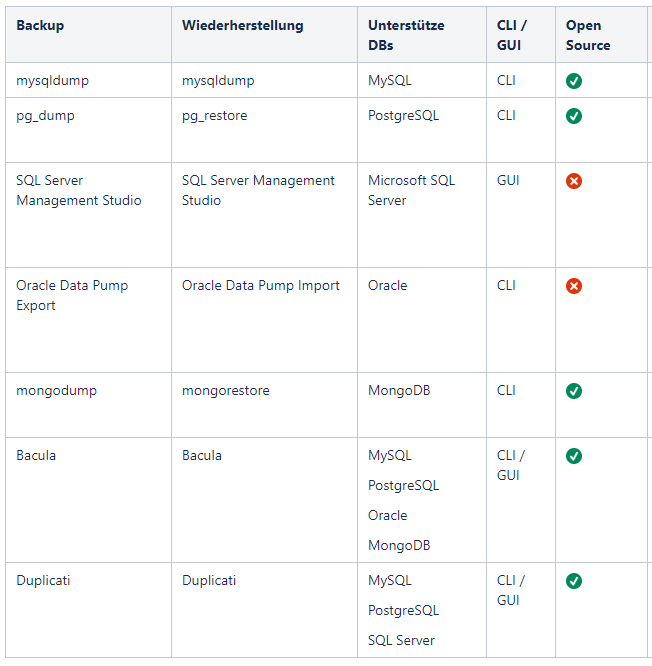
What tools are available for creating and restoring a DB backup?
There are specialized tools for different database types that simplify the backup process. Some of these tools are listed in the following table:
Conclusion: Choosing the right backup strategy
Choosing the right backup strategy depends on several factors: How much data loss is acceptable (RPO), how quickly the data must be available again (RTO), how large is the database and what costs and storage requirements are acceptable? An optimal approach for many companies is a combination of weekly full backups and daily differential or incremental backups. This provides a good balance between storage space, backup speed and restore time.
It is important to test and import the backups regularly to ensure that the data can actually be restored in an emergency. The best backups are useless if they don't work in an emergency.1