Who is not familiar with the following scenario? You join a new project, want to get an overview of the database model and realize that the documentation page in Confluence (if it exists at all) has not been updated for half a year or more. There are DB scripts with schema changes that are much more recent.
Documentation: the necessary evil
Although documentation is often perceived as a chore, it should by no means be neglected in view of its central importance. Clearly defined measures are required to keep the documentation of continuously developing software up to date. For example, the software development process should contain specifications - such as updating the documentation as an integral part of the Definition of Done when changes are made to the DB schema as part of a story. Added to this is the discipline required to consistently adhere to these guidelines.
In DB veritas
Despite everything, discrepancies between the documentation and the actual implemented schema are difficult to avoid. Ultimately, the truth often lies in the database itself.
So why not put the cart before the horse and have the documentation generated from the DB using reverse engineering? If the documentation only consists of ERM diagrams, a brief description of each table and a list of the column names and associated data types, this is quite easy to do.
There are various tools for this purpose. One of them is SchemaSpy. It is very easy to use. It is licensed under the LGPL, which means it can also be used for commercial purposes.
Preparation of the demo database
First of all, we need a database. SchemaSpy supports many different database systems, such as PostgreSQL, Oracle, MySQL, H2DB or Microsoft SQL Server, just to name a few. For this demo, we will start a PostgreSQL DB in a Docker container:
docker run --name postgres-db-doku-demo -p 5432:5432 -e POSTGRES_PASSWORD=password -d postgres:latest
To log on to the database, we need the following configuration data:
- Database: postgres
- User: postgres
- Password: password
- Host: localhost
- Port: 5432
Now we need a corresponding DB schema for which the documentation is to be created. In this demo, I use the schema from the Spring sample project "Pet Clinic"1. I have stored an SQL script for creating the tables as a GitHub Gist under the following link:
Once the script has been executed in the database client of the reader's choice, nothing stands in the way of generating the database description with SchemaSpy.
Create database documentation with SchemaSpy
If you don't want to try out the example yourself, you can view the result directly online here: https://dsblog-db-doku.fly.dev/index.html
To work with SchemaSpy, we need the following artifacts:
- A current Java runtime, as SchemaSpy is a Java program
- SchemaSpy itself. To do this, we download the jar file of the current release from Github (https://github.com/schemaspy/schemaspy/releases). At the time of publication of this blog post, this was schemaspy-6.2.4.jar. We save the file without a version number in the name, i.e. schemaspy.jar.
- A database driver that SchemaSpy requires for the connection to the database. This depends on the database used. In our case, this is the PostgreSQL JDBC driver, also available on GitHub: https://github.com/pgjdbc/pgjdbc/releases. Here, too, we download the corresponding jar file (in this example postgresql-42.7.5.jar) and omit the version number in the file name (postgresql.jar)
We store the configuration information required by SchemaSpy in the file schemaspy.properties in the same directory as the two jar files:
# type of the database. Run with -dbhelp for details
schemaspy.t=pgsql11
# path to JDBC driver
schemaspy.dp=./postgresql.jar
# database properties: host, port number, name user, password
schemaspy.host=localhost
schemaspy.port=5432
schemaspy.db=postgres
schemaspy.u=postgres
schemaspy.p=password
# output dir to save generated files
schemaspy.o=./output
# DB scheme for which to generate the docs
schemaspy.s=petclinic
We will now run SchemaSpy in this directory:
java -jar schemaspy.jar -vizjs
The parameter -vizjs tells SchemaSpy to use the viz.js contained in the jar. Without this parameter, SchemaSpy, Graphviz which must be pre-installed on the computer. Graphviz or viz.js are required to generate the ERM diagrams.
If everything has worked, the generated documentation is now located in the subfolder created by SchemaSpy called output. To view the documentation, open the file it contains index.html in a web browser.
The generated documentation
The start page immediately provides an overview of the database objects contained in the schema.
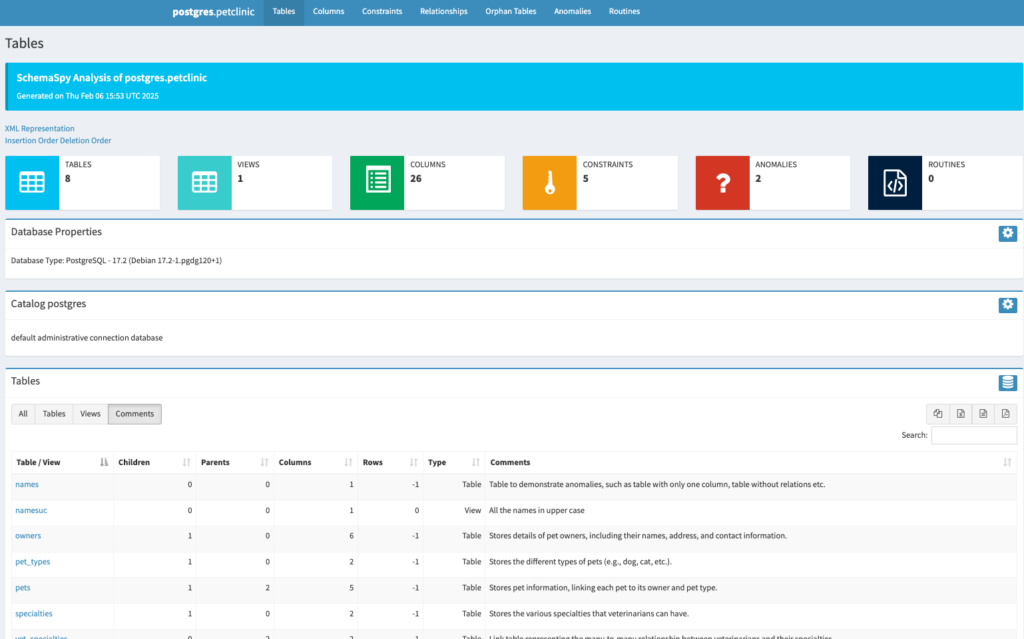
From here you can navigate to the detailed views of the tables, views etc.
You can use the tabs at the top to gain interesting insights into the scheme:
- TablesOverview of all tables and views
- Columns: The columns of all tables and views in a large table
- ConstraintsDatabase constraints such as foreign keys
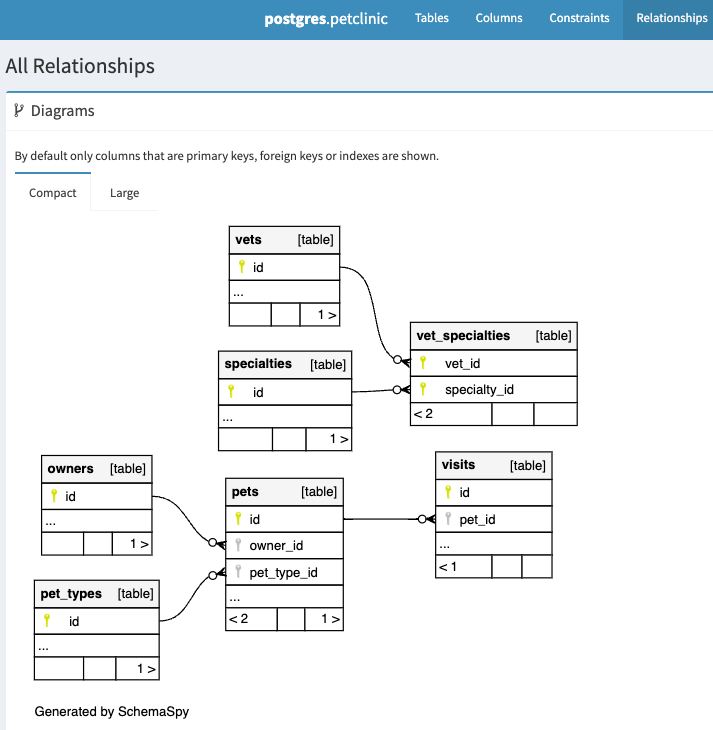
- RelationshipsA diagram in which all tables with foreign key relationships are displayed (in compact or detailed view; the detailed view shows all columns, the compact view only primary and foreign keys and indices).
- Orphan TablesTables without relational relationships
- AnomaliesPoints that could indicate a poor database design, e.g. tables with only one column, tables without inidices, etc.
- RoutinesFunctions and procedures
The table, view and column descriptions can be conveniently exported to Excel, CSV or PDF and copied to the clipboard at the touch of a button.
Say it with comments
Many database systems offer the option of adding comments to database objects such as tables, views or columns using the syntax
COMMENT ON <db object> IS ‘some comment’
Specific examples (these can also be found in the schema creation script mentioned above create_pet_db_schema.sql):
-- describe table pets in schema petclinic
COMMENT ON TABLE petclinic.pets IS 'Stores pet information, linking each pet to its owner and pet type.';

-- describe column id of table pets
COMMENT ON COLUMN petclinic.pets.id IS 'Unique identifier for each pet, auto-generated via a sequence.';
These comments are read by SchemaSpy and displayed in the respective "Comments" column:
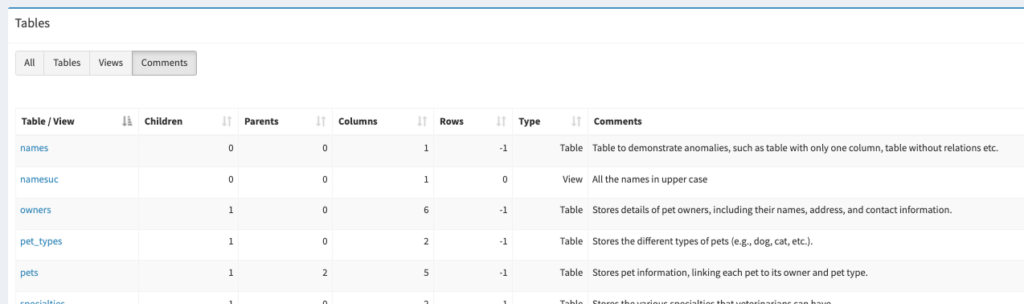
Since, as already mentioned, the whole truth is in the database, the table and column descriptions should also be located there. The comments are very suitable for this.
Automate once, please!
Now you could create the documentation manually every time the database schema changes. However, it is better if this process is automated.
If a database versioning tool such as Flyway or Liquibase is used (which is always a good idea anyway), the generation of the DB documentation should ideally be linked to the process that rolls out the schema changes to the database. For example, if you have a build pipeline with which the Flyway or Liquibase scripts are executed, this can trigger the documentation generation process after successful execution.
This Dockerfile, which generates the documentation and packs it into a container with an nginx web server for delivery, can serve as the basis:
# STAGE 1: create DB documentation with SchemaSpy
FROM amazoncorretto:21 as schemaspy-builder

# set the working directory
WORKDIR /schemaspy

# copy schema spy and JDBC driver
COPY schemaspy.jar .
COPY postgresql.jar .

# copy the SchemaSpy configuration file
COPY schemaspy.properties .

# execute SchemaSpy
RUN java -jar schemaspy.jar -vizjs --host host.docker.internal -dp postgresql.jar -o /output

# STAGE 2: Nginx container for serving the documentation
FROM nginx:latest

# copy the documentation
COPY --from=schemaspy-builder /output /usr/share/nginx/html

# Expose port 80 for the webserver
EXPOSE 80

# Start Nginx
CMD ["nginx", "-g", "daemon off;"]
The image is built with the following command:
docker build -t db-doku .
For this to work, it must be ensured that the database is accessible from the Docker container. Alternatively, the documentation can also be built outside of Docker and only then copied into the nginx image.
The database connection data can be added to the pipeline either via the schemaspy.properties-file, or better, as environment variables.
Conclusion
In order to Databasedocumentation up to date at all times and to avoid the need to create it manually, it is best to automate this process.
SchemaSpy generates comprehensive HTML documentation with export functionality to Excel, CSV and PDF.
Comments on database objects serve as a description and are displayed by SchemaSpy.
It is best to combine documentation generation with a database versioning tool such as Flyway or Liquibase. Rolling out schema changes triggers the update of the documentation. With this procedure, you can also have the appropriate database schema generated for older software versions, together with the corresponding DB documentation for this version.
However, a little discipline is still required, as the descriptions of the DB objects need to be maintained and kept up to date in the form of comments.