
Preparation
Let's create our table
CREATE TABLE tbl_json_example (
     id NUMBER PRIMARY KEY,
     st_character CLOB,
     st_ship CLOB
);
and add some data to it
INSERT INTO tbl_json_example (id, st_character, st_ship) VALUES (
   1,
   '{"character": "Captain Jean-Luc Picard", "rank": "Captain"}',
   '{"ship": "USS Enterprise-D", "registry": "NCC-1701-D", "class": "Galaxy-class", "species": "Human"}'
);
INSERT INTO tbl_json_example (id, st_character, st_ship) VALUES (
   2,
   '{"character": "Commander Spock", "rank": "Commander"}',
   '{"ship": "USS Enterprise", "registry": "NCC-1701", "class": "Constitution-class", "species": "Vulcan"}'
);
INSERT INTO tbl_json_example (id, st_character, st_ship) VALUES (
   3,
   '{"character": "Captain Kathryn Janeway", "rank": "Captain"}',
   '{"ship": "USS Voyager", "registry": "NCC-74656", "class": "Intrepid-class", "species": "Human"}'
);
Now le'ts have a look if everything is fine so far

Our goal is now to move the attribute "species" from the ship column into the character column.
Solution with JSON_MERGEPATCH
Oracle 19c provides a function called JSON_MERGEPATCH to update specific portions of a JSON. So let's have a closer look to see if this is what we're looking for
SELECT json_mergepatch(st_character, '{"species": "SOME_VALUE"}') from tbl_json_example;
Looks fine so far
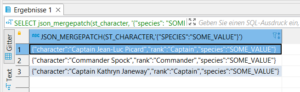
Now let's extend the whole thing so the attribute "species" is read from the ST_SHIP column and added to the ST_CHARACTER column and put it into an UPDATE statement
UPDATE tbl_json_example SET st_character = json_mergepatch(st_character, '{"species": "' || json_value(st_ship, '$.species') || '"}');
It works, nice!

Since we don't want the attribute in our ST_SHIP column, let's delete it. Again, first with a SELECT statement
SELECT json_mergepatch(st_ship, '{"species": null}') from tbl_json_example;
Good
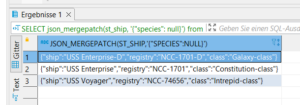
Now for the DELETE statement
UPDATE tbl_json_example SET st_ship = json_mergepatch(st_ship, '{"species": null}');
Final result

Be careful, if your target colum already has JSON attributes, that you want to merge. The function will override them.
Alternative with JSON_TRANSFORM
Since JSON_MERGEPATCH is only available from Oracle 19c on, there is an alternative for the 12c users (sorry if you use older versions)
For insertion
SELECT JSON_TRANSFORM(st_character, SET '$.species' = json_value(st_ship, '$.species')) from tbl_json_example;
and deletion
SELECT JSON_TRANSFORM(st_ship, REMOVE '$.species') from tbl_json_example;
Sources:
Learn more about software development