
Temporal API - short introduction
It is a tiresome topic in most languages, but in JavaScript - I can say from my own experience - it is a very tiresome topic. One of the issues is that when creating date objects in JavaScript, it depends on the browser implementation which time is displayed. Calculating with date and time is also difficult with JavaScript. That is why there are some frameworks specifically for this purpose. But today it is not about moment.js or similar, but a proposal to change the current implementation of JavaScript - Temporal API.
The Temporal API is currently in the 3rd stage of a 4-stage process to include the API in the standard JavaScript implementation. Requests that are in the 3rd stage will most likely no longer be changed and are just waiting to be implemented in the final stage.
For us as front-end developers, this means that we can test ourselves and integrate the API via polyfills. See: List of polyfills
Quick start - what Temporal looks like
To get you started, I'll show you how to display the time in Temporal:
import { Temporal } from "proposal-temporal";

const currentTime = Temporal.now.plainDateTimeISO();
 console.log(currentTime.toString()); // Ausgabe:
                                        2021-06-03T08:22:18.381338378

const timeStamp = Temporal.now.instant().epochSeconds;
console.log(timeStamp); // Ausgabe: 1622701338
const christmas = Temporal.PlainDateTime.from({
  day: 24,
  month: 12,
  year: 2021,
  hour: 20,
  minute: 15,
  second: 32
});
console.log(christmas.toString()); // Ausgabe: 2021-12-24T20:15:32
The charming thing here is that the ISO string is output directly at "plainDateTimeISO" and that with "epochSeconds" the UNIX timestamp is returned. Both are important formats for displaying time.
Conversions and time zones
If you want to use Temporal and already have a project in which you use the Date API, you can convert the respective objects as follows:
import { Temporal } from 'proposal-temporal';

const date = new Date('2020-12-24T20:15:32');
const temporal = new Temporal.ZonedDateTime(
  BigInt(date.getTime() * 10 ** 6),
  'Europe/Berlin');
console.log(temporal.toString());
  //2020-12-24T20:15:32+01:00[Europe/Berlin]

const temporal2 = Temporal.ZonedDateTime.from({
  year: 2020,
  month: 12,
  day: 24,
  hour: 20,
  minute: 15,
  second: 32,
  timeZone: 'Europe/Berlin'
});
const date2 = new Date(temporal2.epochMilliseconds);
 console.log(date2.toLocaleString()); // Ausgabe: 24/12/2020, 20:15:32
One problem with the JavaScript Date API is that it is not possible to create a date object that is independent of a time zone. In some cases, however, information about the time zone is not desired. The Temporal API solves this as follows:
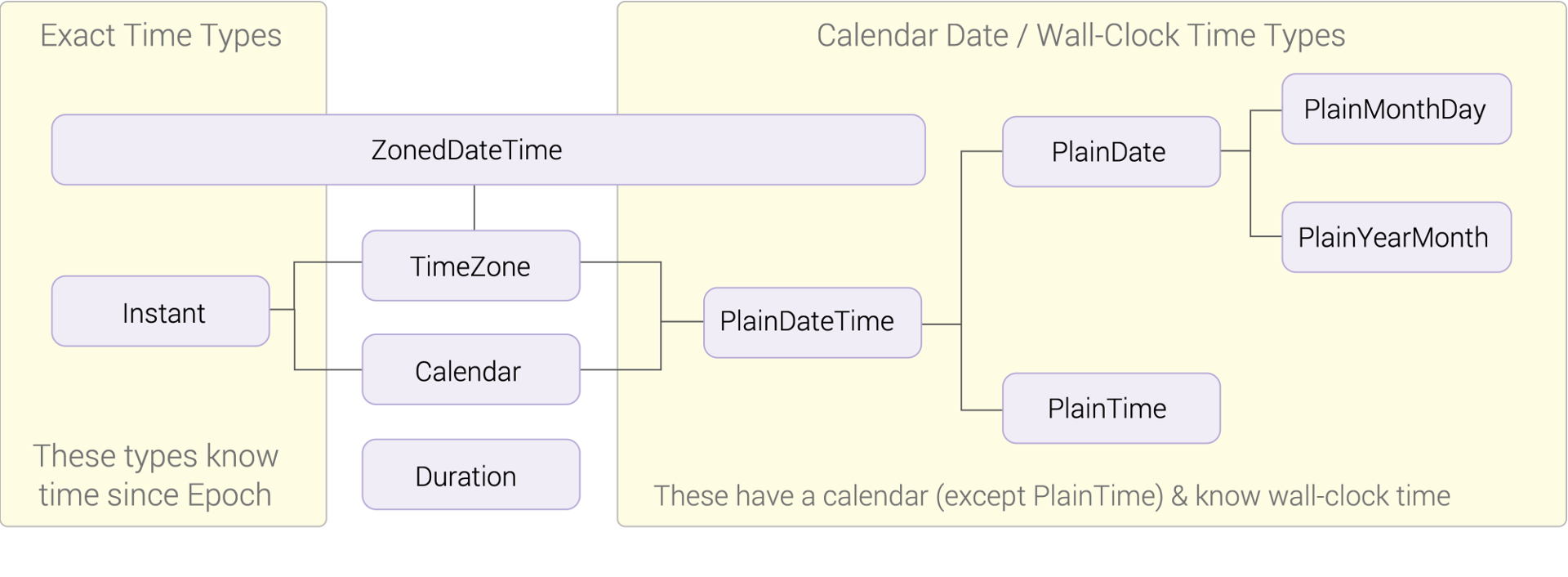
There are now two objects that can be created independently of a time zone - one for calendar objects and one for time objects. However, as you can see in the graphic, you can also define a time zone in these objects (as can also be seen in our conversion example above).
Calculating with time
At the moment it was not possible to "simply" calculate with time in the Date API. Temporal finally offers functions to calculate with it:
import { Temporal } from 'proposal-temporal';

const now = Temporal.now.plainDateTimeISO();
console.log(now.toString()); // Ausgabe: 2021-06-03T19:26:42.949202945
const future = now.add({days: 30});
console.log(future.toString()); // Ausgabe: 2021-07-03T19:26:42.949202945
console.log(now.toString()); // Ausgabe: 2021-06-03T19:26:42.949202945
What is also often required is the time between two points in time. Temporal also offers a few functions here:
import { Temporal } from 'proposal-temporal';

const start = Temporal.PlainDate.from({
  day: 24,
  month: 12,
  year: 2021
});

const end = Temporal.PlainDate.from({
  day: 8,
  month: 1,
  year: 2022
});

const diff = start.until(end);
const diff2 = end.since(start);
console.log(diff.toString()); // Ausgabe: P15D
console.log(diff2.toString()); // Ausgabe: P15D
Conclusion
I am very happy about the new API and can only say that it was about time that JavaScript got a good standard. Unfortunately, as I said, it is not yet clear when the Temporal API will finally be included in the standard, but it is available as an alpha version and can be integrated as a polyfill. I really like what I've seen of Temporal API because it also offers date and time calculations, which was currently only possible when large frameworks like moment.js were integrated.
I can only recommend trying Temporal API!
Sources:
[1] JavaScript examples: https://www.heise.de/blog/Die-Temporal-API-besseres-Datehandling-fuer-JavaScript-6069626.html
[2] Image for time zones: https://www.heise.de/blog/Die-Temporal-API-besseres-Datehandling-fuer-JavaScript-6069626.html
[3] Temporal GitHub Repository: https://github.com/js-temporal/temporal-polyfill
[4] Proposal Status Page: https://github.com/tc39/proposals