
A small note in advance: I will not explicitly go into a detailed description of how the Shadow DOM and HTML templates work. Instead, I will limit myself to the Custom Elements, which in my opinion is the most important JavaScript API in connection with Web Components.
What are Web Components?
Web Components is a nice analogy to a toolbox. A toolbox typically contains tools to implement certain projects. Projected onto a web component, the end result would be one or more user-defined HTML elements that can be reused in web applications. But back to our toolbox. So what are the tools at our disposal? The answer is simple: Custom Elements, Shadow DOM and HTML Templates.
- Custom Elements: These are several JavaScript APIs that enable the creation and use of DOM elements with a special HTML tag.
- Shadow DOM: These are several JavaScript APIs that make it possible to use a separate, independent DOM.
- HTML templates: An extension of the common HTML specification in which certain HTML content is instantiated at runtime.
What is the biggest advantage of native web components compared to common frameworks and libraries?
With frameworks and libraries such as React, Angular, Vue or jQuery UI, it is possible to build reusable, powerful component constructs. Incidentally, the combination of components in the DOM or UI is also known as a component tree. But back to our powerful components. Every power has a dark side, including that of frameworks and libraries. We are simply bound to the respective framework. With native web components, on the other hand, technology-independent reuse is possible. Cool, right?
What flavors do the Custom Elements come in and what are the differences?
Two variants are available to us as part of the Custom Elements specification:
- Extended standard elements: Standardized HTML elements such as <button>, <intput>, <a>etc.
- Completely independent elements: The inheritance basis here is not a special standardized HTML element, but the superordinate HTMLElement class.
In addition to the main difference mentioned above, there are other differences. But I'll spare you those at this point.
What are custom element reactions? Which ones are there?
These are callback methods that are called by the browser in the various stages of a custom element's life cycle. The following reactions are available to us: connectedCallaback(), attributeChangedCallback(), adoptedCallback() and diconnectCallback().
How can custom elements be individualized in addition to the reactions?
It is possible to manage both standardized and non-standardized attributes as part of the custom elements. By management, I specifically mean the initialization and synchronization of attributes. The same is also possible for properties. I have also deliberately left out the difference between attributes and properties in the context of the HTML standard, as this would make the article even more complex. Interaction with events is also possible. Interaction with both standardized and non-standardized events is also possible. Note: Since completely independent custom elements also inherit from the HTMLElement class, the DOM's event management system is also available for these.
What is explicitly considered in the course of custom elements and events?
Event listeners consume resources and must always be removed if they are not used. The disconnectCallback() method is available for this purpose.
Now to the prize question: How can we use SCSS in our Custom Elements and is it even possible?
First of all, the use of SCSS in Custom Elements is possible in principle. But external help is required. We have to use another NPM package. "sass-to-string" converts under the hood SASS-files to JavaScript strings, which in turn represent JavaScript modules. The following is an example:

This allows the JavaScript module to be made available and reused via an import statement.
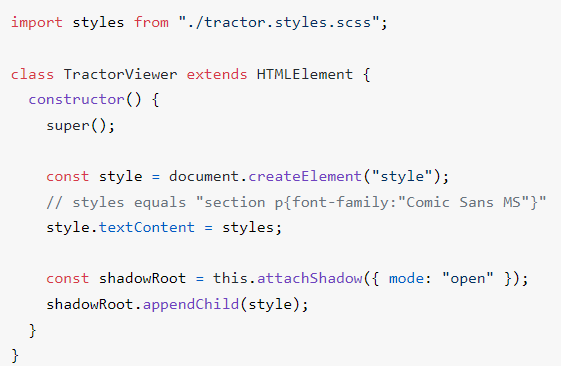
It should be mentioned that Webpack is required to "bundle" it cleanly. The configuration required for this can be taken directly from the NPM package.
Conclusion
Web components have become an integral part of our everyday lives. Common frameworks and libraries demonstrate this API-based construct to us every day. With the "sass-to-string" package, we have now added another tool to our component kit. It requires additional setup in the webpack, but the effort is worth it...