What is JPA-Buddy?
In addition to entity and DTO classes, the plugin can also generate and extend mappers, as well as create migration scripts and Spring Data Jpa repositories.
After installation, the plugin integrates very well into the IDE. At no time do you have the feeling that the plugin is interfering or overwhelming you with its full scope.
How does it do that? By only providing the functions that can be used in the project. If, for example, you have no dependencies for Lombok or Validation API, some menus are not even displayed.
In this post, we take a look at some of the features provided by JPA-Buddy.
To do this, we write a small Spring Boot service with access to the database. JPA-Buddy supports the creation of database entities, DB migration scripts, DTOs, mappers and Jpa repositories.
Creating entities from an existing database
Creating migration scripts
DTO & mapper generation
Spring Data JpaRepository
Conclusion
Creating entities from an existing database
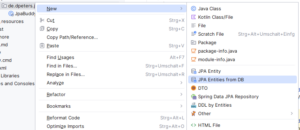
The starting point for the service is an Oracle database that contains the tables T_ORDER and T_CUSTOMER. We want to generate entities for these in the service. To make this work, we first create a datasource. We then select "JPA Entities from DB" at package level via the context menu.
After a brief synchronization with the database, we see all tables that are visible in the selected schema. The tables relevant to the service can be selected here, relationships established and both package and class names assigned.
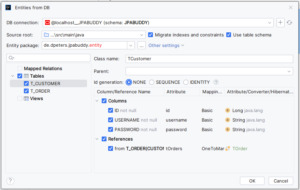
If Lombok is used, getters and setters are immediately omitted and replaced by corresponding annotations. The validation API is also integrated directly.
In the entity itself, the plugin extends the view with functions of the JPA Designer, which can be used to make further settings.
Creating migration scripts
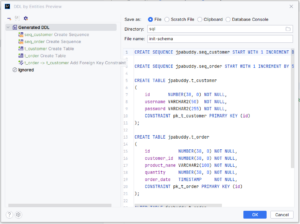
We can generate database scripts for the entities we have just created. Both classic SQL scripts and Liquibase / Flyway scripts are possible if the appropriate dependencies are used. In our example, we generate an SQL script. The procedure is identical for all options. Both initial and update scripts can be generated.
The existing code is synchronized with the database and the changes are recorded in the script.
DTO & mapper generation
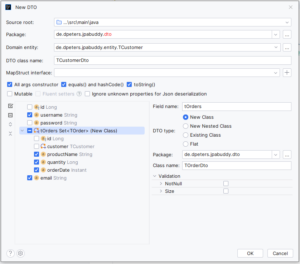
We continue with DTO classes and mappers. To do this, we open one of the classes - e.g. TCustomer and select the "Create DTO" option.
In the following window, we can define the target package, select attributes contained in DTO, include validations and make further settings. If Mapstruct is in use, mappers can also be configured directly in this window.
Spring Data JpaRepository
Last but not least, we create a Spring Data Jpa repository. The procedure is identical to that for creating DTO classes. Open the entity and select the "Create Spring Data Repository" option.
Numerous settings can also be made here - for our example, we select "Bulk" instead of "Single" in the top right-hand corner so that we can generate repositories for all entities at the same time.
JPA-Buddy offers even more powerful features for the use of repositories. One of these is that repositories can be extended with methods from anywhere.
An example - the service is to be expanded to include a new search function that can be used to search for customers who have placed orders in a specific period, sorted by date in descending order. The user name should be used with a like search and not be case-sensitive.
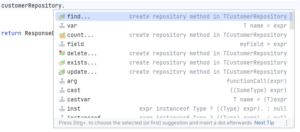
It is difficult to conjure up the syntax directly from memory without errors. The long method name also increases the error rate. No problem with JPA-Buddy. Simply generate the required method at the point where the call is needed via code completion - in the example a find method.
All desired search parameters can be set in the following window.
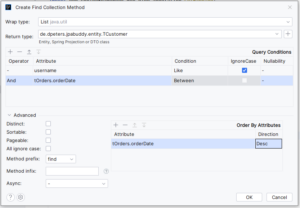
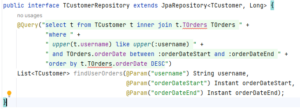
The result is convincing, but difficult to read and understand. A query is the better choice at this point. JPA-Buddy also offers a solution for this, in the form of query extraction.
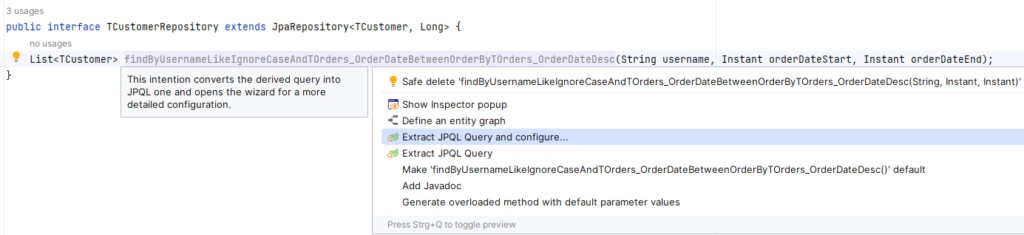
This allows the method name to be customized and the search is extracted into a JPQL query.
Conclusion
In this blog post we have shown how well the JPA-Buddy plugin is integrated into IntelliJ. Only a few lines of code had to be written during the entire example. Most of the work was done by the plugin. The useful features support all developer levels and simplify the entry into the JPA world. The targeted omission of features that are not configured in the project also contributes to the ease of use.
Many of the features are already included in the free version. If you are using IntelliJ Spring Data and JPA, the plugin is definitely worthwhile!
The license is particularly worthwhile if you work a lot with Liquibase / Flyway or often have to write migration scripts or work a lot with the combination of entities, DTO and mappers. For example, at the beginning of a project, when the data model is being created, the plugin saves a lot of time and therefore money.
For those who want to see the plugin in action, there is a 15-minute recording:
You are currently viewing a placeholder content from YouTube. To access the actual content, click the button below. Please note that doing so will share data with third-party providers.
More InformationSources:
Learn more about software development