
How many hours a week do you spend researching new technologies? And how many of them are wasted? Especially in the IT environment, a lack of overview of new trends can be a real competitive disadvantage. But there is another way - with AI and structured web searches.
Why classic web research often fails
Countless articles, studies and blog posts are published every day. Extracting relevant information from these is time-consuming, error-prone and often difficult to scale. This is a major challenge, especially for IT service providers who always want to offer their customers modern solutions.
Example: Do you want to find out which relational database technologies are currently hot? Without automated help, this can take you days - and you risk missing out on important trends.
Solution: Automated technology scouting with AI
With the help of AI-based language and search assistants, you can make your search process more efficient. This is done by combining the LLM with the assistant's web scraping technologies and structured output formats such as JSON or CSV.
Step by step to automated scouting
- Define specific search criteria
You specify exactly what should be searched for - for example, by describing the technology and providing suitable examples. The search criteria should already be available in a structured form so that they can be processed automatically.
Here is an example of relational databases:
{
"function": "storage-structured",
"description": "Technologie zur Speicherung von strukturierten Daten...",
"examples": ["ANS RDS / PostgreSql", "AZ PostgreSql"]
}
- Automated search and data acquisition
The criteria are processed by a script, transferred to the LLM and the relevant web data is collected by a crawler. - Structured preparation
The results are analyzed, categorized and output in a machine-readable format. - Direct further processing
The data is then available for dashboards, reports or other processes - without any manual reworking.
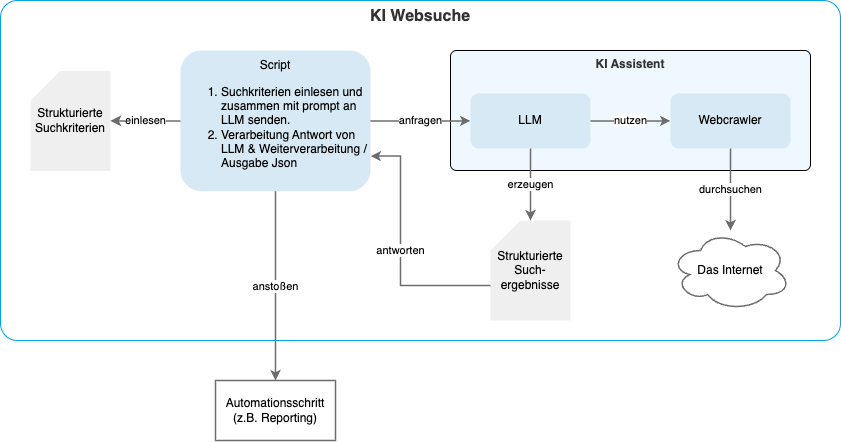
This setup reads in structured criteria and transfers them to an LLM, which extracts relevant information from the Internet using a web crawler. The results are saved automatically and can be used for reporting, for example.
An exemplary, abbreviated result for relational cloud databases could look as follows:
| Technology | Description | Pros | Cons |
|---|---|---|---|
| Alibaba Cloud RDS | Managed relational database service supporting multiple database engines. | ['Supports various engines (MySQL, PostgreSQL, SQL Server)', 'Integrated with Alibaba Cloud', 'Scalability'] | ['Less global presence compared to AWS or Azure', 'Regional limitations'] |
| DigitalOcean Managed Databases | Managed database service with automated backups and scalability. | ['Simple pricing', 'Automated backups', 'Scalability', 'Developer-friendly'] | ['Limited to smaller-scale applications', 'Fewer enterprise features'] |
| Google Cloud SQL | Managed relational database service for MySQL, PostgreSQL, and SQL Server. | ['Cloud-native', 'High availability', 'Integrated with Google Cloud services', 'Automatic backups', 'Scalability'] | ['Cost can increase with scale', 'Limited to supported SQL versions'] |
| Microsoft Azure SQL Database | Managed cloud database service for SQL Server. | ['Cloud-native', 'Integrated with Azure ecosystem', 'Automatic scaling', 'Advanced security features'] | ['Complex pricing model', 'Limited to SQL Server'] |
| Oracle Autonomous Database | Self-driving cloud database service for running Oracle Database workloads. | ['Autonomous management', 'High performance', 'Scalability', 'Integrated with Oracle Cloud'] | ['Higher cost', 'Oracle expertise required'] |
A look into practice: This is how we at doubleSlash keep our technology stack for data-driven solutions up to date
At doubleSlash, we use precisely this principle to ensure the Data Driven Solution (DDS) TechStack on a regular basis. We have defined specific search criteria for each function module in the stack and stored them so that they can be processed automatically.
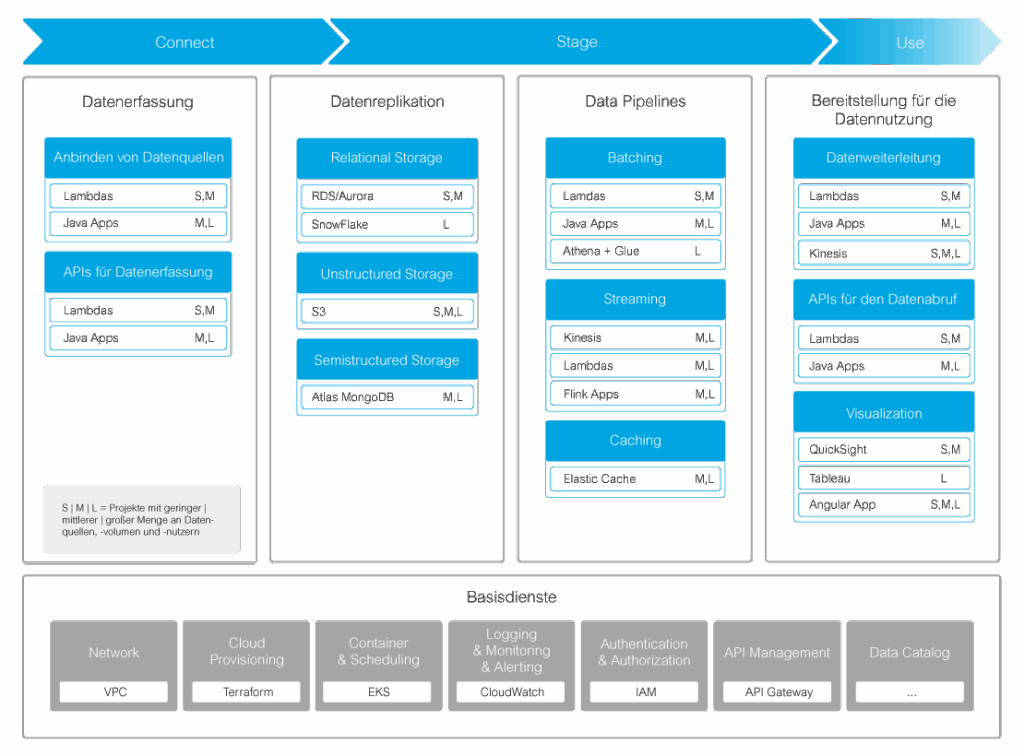
To ensure that we are always up to date, a GitLab pipeline is triggered at the start of each week, which generates the latest results and sends them out automatically. We can then use this trend reporting to check interesting technologies, tools and methods for productive usability and, if suitable, add them to our TechStack.
More than just trend tracking: other areas of application
The current status is a proof of concept - with room for improvement. Optimizations are possible above all in the area of evaluating the relevance of the results. For example, the LLM could be instructed to evaluate the selected technologies, tools and methods according to the arc42 Quality Model (https://quality.arc42.org/) and calculate a score to differentiate between highly relevant and less relevant trends.
In addition to technology scouting, the procedure described can be used in many other areas:
- Competitive analysis: Automatic recording and analysis of competitor activities in various markets.
- Market trend monitoring: Identification of new developments in specific sectors based on current web content.
- Scientific research: Support in the search and categorization of relevant publications for research and development.
- Reputation management: Continuous monitoring of online media to analyze the public perception of a company or product.
- Supplier evaluation: Automated analysis of ratings, reports and news about potential business partners.
Conclusion: How to make your research more efficient and scalable
AI helps you to make web research more efficient, structured and, above all, scalable. This allows you to make better decisions based on data - and use your time for what really matters: Strategy, innovation and implementation.
How could automated scouting support your team? Write us your ideas!