Artificial intelligence is no longer just a research topic. Companies want to use it productively - e.g. for assistants, knowledge management or automated processes. However, cloud-based solutions have their limits: Data protection, compliance, cost control and dependencies on third-party providers are just some of the challenges.
An exciting approach is therefore the local execution of language models in combination with a user-friendly interface and flexible interfaces. This is exactly where OpenWebUI, Ollama and MCP (Model Context Protocol) come into play.
What is behind it?
OpenWebUI - The interface for users
OpenWebUI is a self-hosted web interface that makes access to language models much more convenient. It can be operated in the company network and thus enables full control over data and configuration.
AI models can be used conveniently via the modern chat environment, with functions such as:
- Multi-user management
- Support for various models
- Integration of tools and APIs
- Responsive UI, also usable on mobile devices
This also makes operation attractive for users outside the developer environment.
Ollama - Execute models locally
While OpenWebUI provides the user interface, Ollama takes care of the execution of the language models.
Ollama makes it possible to operate large language models locally - such as LLaMA, Mistral or Code Llama - without having to send data to external cloud providers.
The advantages are obvious: full data sovereignty, no API costs and high flexibility in the choice of model.
MCP - the protocol for tools
The Model Context Protocol (MCP) extends the capabilities of language models by providing access to external tools and data sources. MCP can be used to integrate functions such as file access, web queries or database queries in a standardized way.
With projects such as mcpo (MCP-OpenAPI-Proxy), it is possible to integrate existing tool servers into OpenWebUI - and thus seamlessly integrate AI-supported workflows into company processes.
Architecture & interaction
The interaction between OpenWebUI, Ollama and MCP can be described as a modular stack
- OpenWebUI serves as the front end - this is where users interact with the AI.
- Ollama provides the desired language models in the backend.
- MCP enables the connection of external tools.
- There are two levels for this:
- po (MCP-OpenAPI-Proxy): acts like an OpenAPI server for OpenWebUI, but translates internally into MCP.
- MCP server: the actual tool implementation, which provides functions via MCP.
Data flow: OpenWebUI (OpenAPI) → mcpo → MCP server (tool)

This ensures clear separation: OpenWebUI expects OpenAPI, mcpo translates, MCP-Server implements the logic.
Why the local AI stack is worthwhile for your company
The combination of OpenWebUI, Ollama and MCP opens up several advantages for use in the corporate context:
- Data protection & compliance: All data remains in the company network.
- Cost efficiency: No usage-dependent API fees.
- Flexibility: Different language models can be tried out and integrated.
- License clarity of the models: Check the license conditions of the models, especially for business use.
- Acceptance: A modern and intuitive interface ensures a high level of user-friendliness.
- Scalability: From pilot to rollout throughout the entire company.
Quick guide: Getting started with Docker
It makes sense to get started quickly in two stages:
- Basis (Ollama + OpenWebUI only) for initial tests
- Extended (with MCP) for the connection of external tools
1) Basis: Ollama + OpenWebUI
Install Ollama (Host):
curl -fsSL https://ollama.com/install.sh | sh
OpenWebUI single container:
docker run -d -p 3000:8080 --name openwebui \
  -e OLLAMA_BASE_URL=http://host.docker.internal:11434 \
  ghcr.io/open-webui/open-webui:main
Docker Compose (recommended):
version: '3.8'
services:
  ollama:
    image: ollama/ollama:latest
    ports:
      - "11434:11434"
    volumes:
      - ./ollama:/root/.ollama

  openwebui:
    image: ghcr.io/open-webui/open-webui:main
    environment:
      - OLLAMA_BASE_URL=http://ollama:11434
    ports:
      - "3000:8080"
    depends_on:
      - ollama
2) Extended: MCP integration with mcpo
mcpo acts as a proxy that translates OpenAPI interfaces into MCP calls.
The process: OpenWebUI (OpenAPI) → mcpo → MCP server (e.g. uv).
services:
  mcpo:
    image: ghcr.io/modelcontextprotocol/mcpo:latest
    environment:
      - MCP_SERVER_NAME=example
      - MCP_SERVER_CMD=uv
    ports:
      - "8000:8000"
Example Usecase: Confluence via uv (MCP) behind mcpo
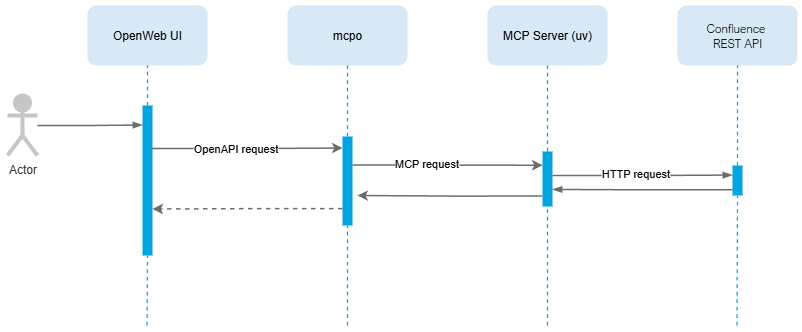
Many companies use Confluence as a central knowledge platform. Without leaving the UI, users can ask questions in OpenWebUI ("Show me the travel policy") while Confluence is queried in the background.
Rolls & Flow:
- OpenWebUIChat frontend; connects tools via OpenAPI.
- mcpoacts like an OpenAPI endpoint and translates calls into MCP.
- uv (MCP server)implements Confluence operations and talks to Confluence REST.
Data flowUser → OpenWebUI (OpenAPI) → mcpo → (MCP) uv → Confluence REST
Interaction example:
Conclusion: Local AI that really drives your business forward
With OpenWebUI, Ollama and MCP, you can build a scalable, data protection-friendly and completely local AI stack - without cloud dependency.
Your sensitive company data remains protected in your own network. At the same time, you reduce running costs and create the basis for tailor-made AI applications.