Meta developed the framework to reduce the time and effort required to measure, optimize and control application and interaction load times, among other things. The tech giant was thus able to reduce the time and effort required for the well-known website "Facebook.com". Reduce "out of memory" crashes by 50 %. In 2022, Meta published the framework as an open source project (MIT license) [1].
What functions does MemLab offer?
|
|
|
|
|
|
|
|
Where can MemLab be used?
MemLab supports JavaScript and TypeScript Applications. In addition to the JavaScript runtime environment Node.js are also Single-page applications with the frontend framework React supported.
The framework can also be integrated into a CI pipeline to integrate regular Automated end-to-end tests for an application and check for memory leaks:

(MemLab console command, source: https://facebook.github.io/memlab/docs/guides/guides-detached-dom)
Under the hood, the end-to-end testing framework is carried out using a Puppeteer API, but can also be integrated into existing testing frameworks [3].
MemLab: Test based on requirements
To put MemLab to the test, a small example is carried out. An example project from Meta is used for this. For this example, MemLab is set against the following requirements:
Detached DOM elements are HTML elements that have been removed from the DOM, but whose memory is retained due to JavaScript. |
Setting up an example
The following example project is cloned from this Git URL and built locally (npm i && npm run build):
https://github.com/facebook/memlab.git
(The build script 'npm run build' from Meta threw an error, which after a short research leads back to difficulties with the "rm" command on Windows operating systems. In the context of the example, you can avoid the error by omitting the command "npm run clean" and executing the command "npm run build-pck -workspaces" manually instead. An alternative would be to install a node package that fixes the error - however, this is not used in the example)
In the path packages/e2e/static/example of the example, the command "npm run dev" can be used to start a development instance that can be accessed via the browser under "localhost:3000":
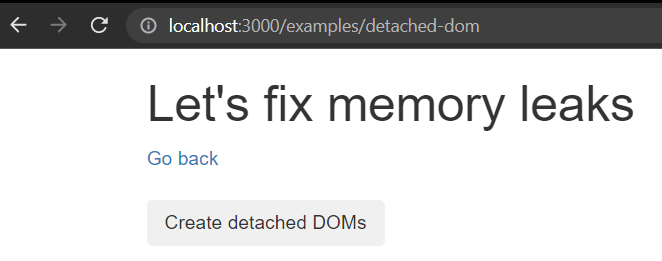
(Screenshot from the MemLab example, source: MemLab sample project)
Detection of memory leaks
In the application shown above, clicking on the button calls up a function to create memory leaks by creating all DIV elements:
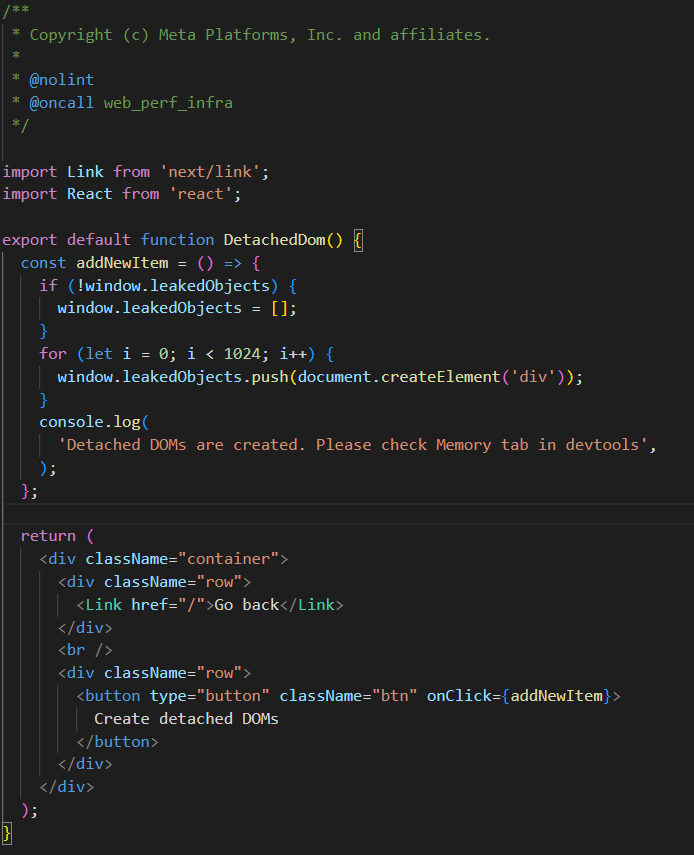
(MemLab Detached-DOMS example, source: own screenshot)
To have the MemLabs app search for memory leaks, a scenario must first be defined:
In this file, the URL for a scenario and a series of interactions are specified for which MemLab is to check whether a memory leak occurred within them. In this case, the URL of the sample application should be returned and the button clicked to create a set of Detached DOM elements in the form of numerous DIV elements:
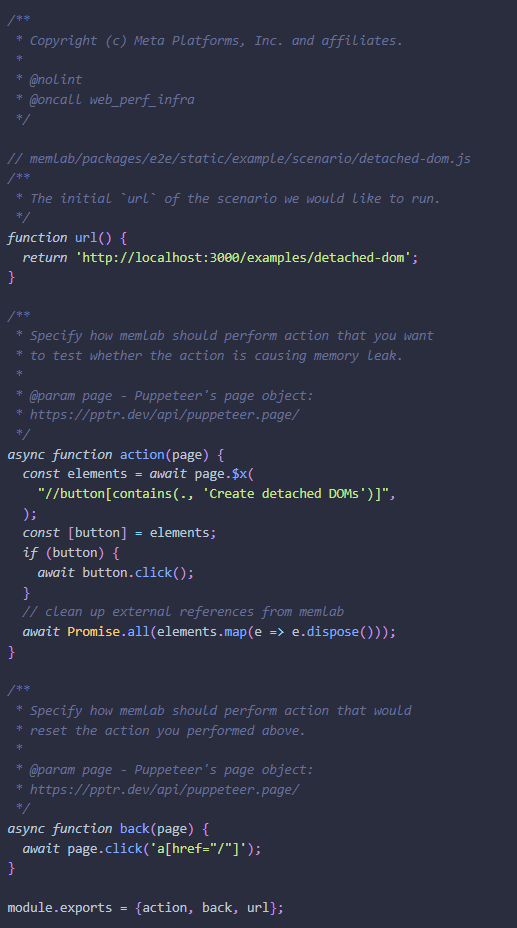
(MemLab scenario example, source: https://facebook.github.io/memlab/docs/guides/guides-detached-dom)
MemLab can now run through the scenario and check for memory leaks. To carry out this process, the following command must be executed:
memlab run --scenario ~/memlab/scenarios/detached-dom.js
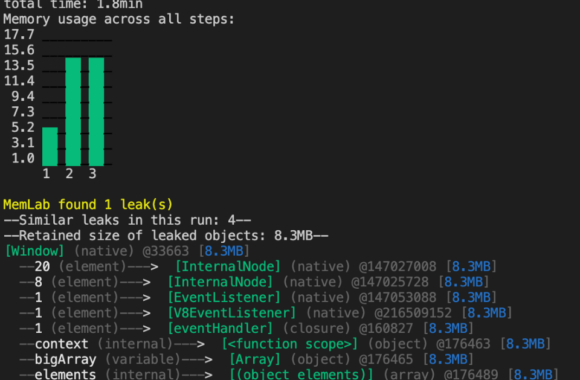
The run starts in the console. As with end-to-end tests, MemLab runs through the previously defined scenario. First the navigation to the application, then the click on the button. A console output at the end of the run visualizes important key figures with regard to memory leaks:
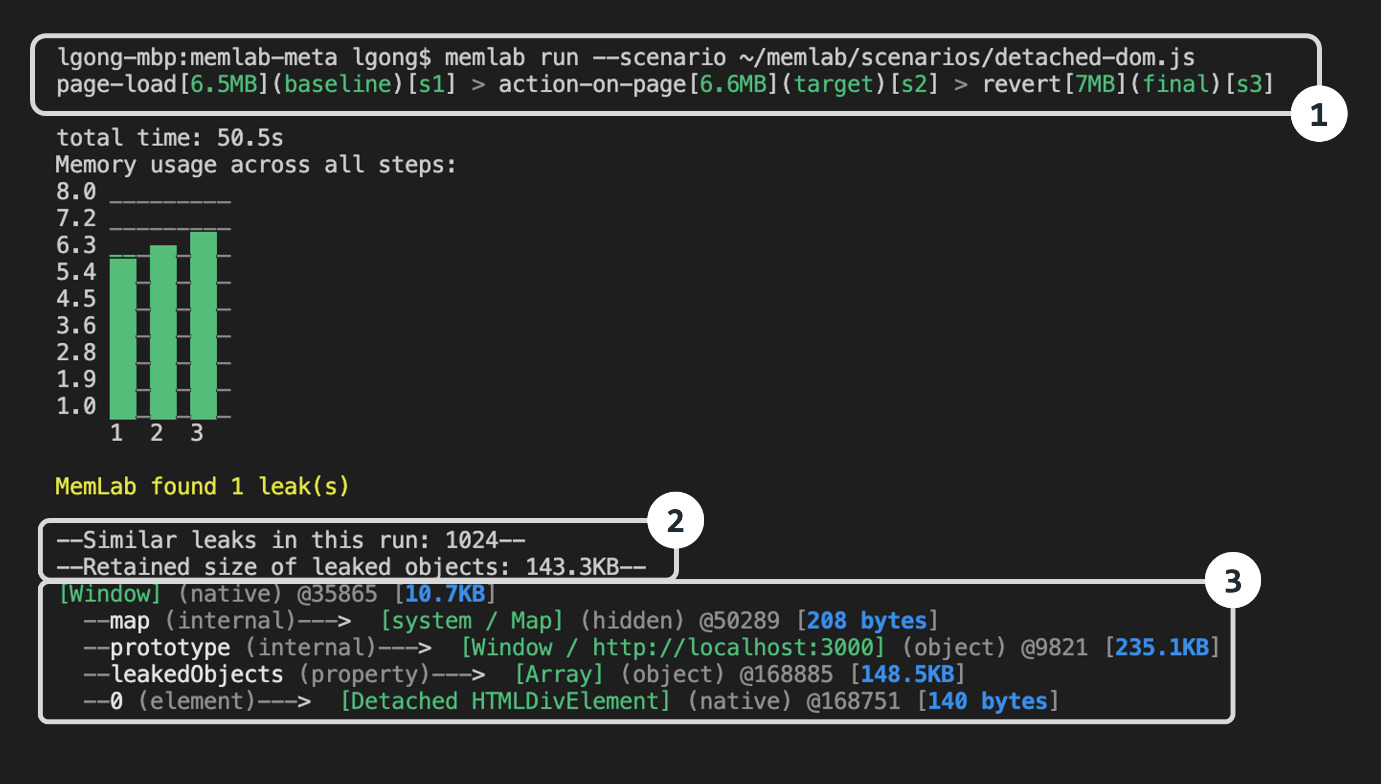
(MemLab Scenario console edition, source: https://facebook.github.io/memlab/docs/guides/guides-detached-dom)
1: The size of the heap from the initial page call to the final state of the run is displayed here
2: This shows the number of similar leaks and the memory size of the total unintentionally released memory
3Here MemLab creates a record of actions and events that led to the leak. This allows the developer to better understand at what point a memory leak occurs
The previously added "leakedObjects" are also listed and thus recognized.
Recognition of large JavaScript objects
A similar small application is created for this purpose, which creates an array list with over one million entries when a page is called up:
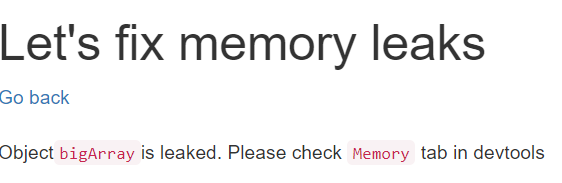
(MemLab Oversized Objects example, source: own print)
A scenario for MemLab is also created for this, which calls up the page and navigates away again so that a start and end state can be determined. Since MemLab does not explicitly list oversized objects by default, a filter must be defined for this purpose, which displays all objects that protrude beyond a certain size as a leak. This is just one example (leakFilter) of user-defined filters that can be defined for a run as required:
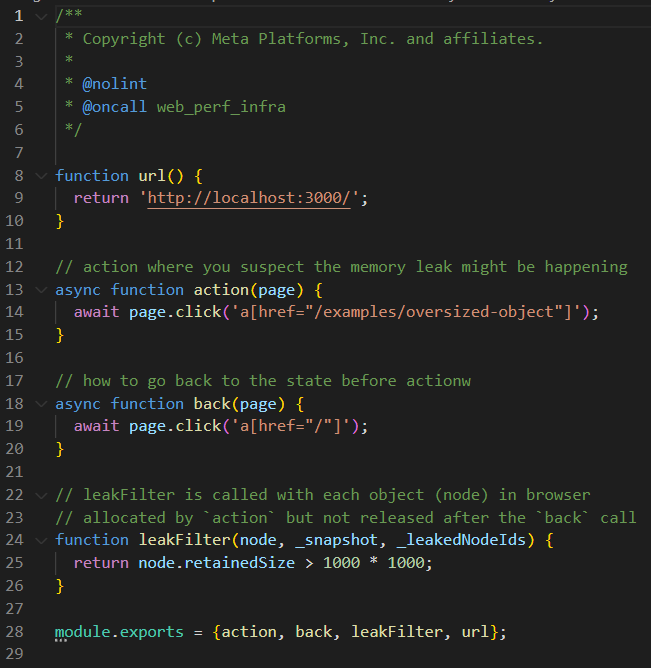
(MemLab Oversized Object example, source: https://facebook.github.io/memlab/docs/guides/guides-detect-oversized-object)
The scenario can now be executed with the following command:
memlab run --scenario ~/memlab/scenarios/oversized-object-with-filter.js
Console edition:
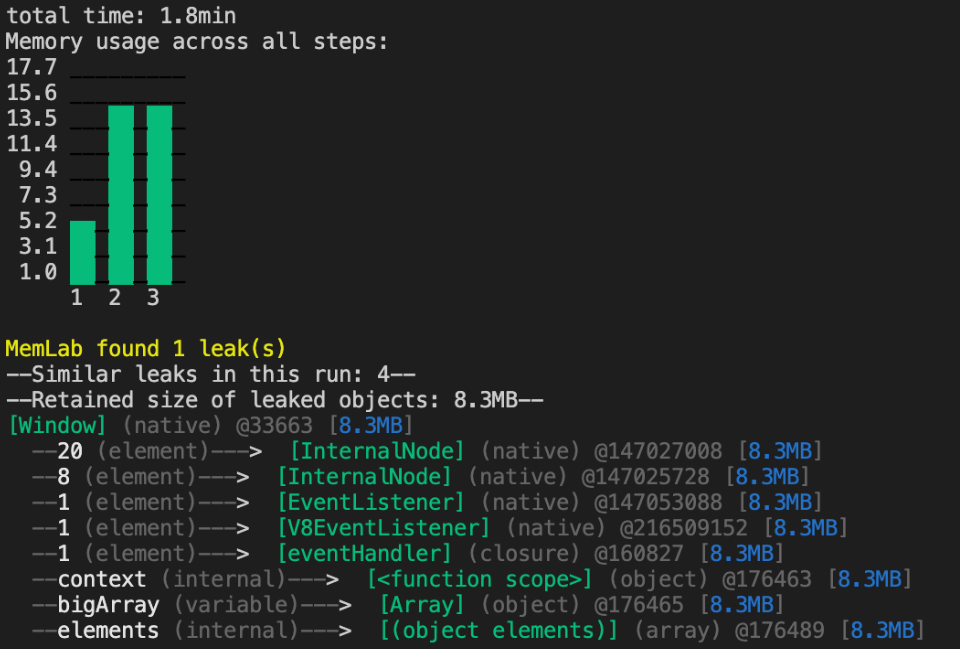
(MemLab Oversized Object with leak filter example, source: own excerpt)
If the filter had not been defined in the scenario, MemLab would not output a leak. So we can see in the trace below that the array list named "bigArray" is related to the leak.
Conclusion
MemLab was able to meet the above requirements and overall gives the impression of being a rather helpful framework for the analysis and optimization of an application.
Should MemLab be included in projects?
In view of the functions in the examples, it is important to mention that MemLab has much more to offer (see list above). Especially for integration into the development process, MemLab offers automatisms that save time and effort for such analyses. One example is the automatic recording and saving of screenshots showing run-through results. For applications that are compatible with MemLab and struggle with memory or loading time problems, the framework is quite supportive. However, MemLab could also entail major risks:
The use of MemLab in combination with other frameworks has hardly been documented, if at all. MemLab was published in 2022 and raises many unanswered questions due to its novelty. These include compatibility with other languages and frameworks. One example of this is its use with the front-end framework Vue.js. This is not yet officially compatible. Nevertheless, this can be made possible with some effort, for example by overwriting functions [4]. The use of other testing frameworks such as Playwright from Microsoft is probably also possible via additional steps [5].
Should problems arise, there are hardly any results on the Internet that refer to this framework. This means that you are largely dependent on the official documentation or the developers in the event of problems.
Meta releases 2-3 new versions of the framework per month [6]. This indicates that the framework is being actively developed and maintained. It is recommended that MemLab be used with caution at the current stage of development.
Source reference:
[1]: https://engineering.fb.com/2022/09/12/open-source/memlab/
[2] https://github.com/facebook/memlab
[3] https://github.com/facebook/memlab/issues/37
[4] https://github.com/facebook/memlab/issues/35
[5] https://facebook.github.io/memlab/docs/intro
[6] https://www.npmjs.com/package/memlab/v/1.1.13?activeTab=versions