
Validation is a central discipline in the development of front ends of all kinds. It ensures that data is recorded validly. Protection against visual spoofing is therefore a central task of validation logic. Even if you are working completely without frameworks such as Angular or libraries such as React, the W3C standard offers a number of tools to ensure good validation.
Validation with board resources of the W3C consortium
The seemingly simplest form of validation is whether a field has been filled in or not. Also known as a required field.
Now copy the following strings into the input field and discover for yourself what the standard browser validation does with them. To do this, double-click in the deactivated, small text field and then copy with [Ctrl]+[C]. After pasting, click on the "Test" button via [Ctrl] + [V].
As you will have noticed, both the classic space character and the other two special characters are not "validated" by required. As a front-end developer, the most obvious solution here would be to use the JavaScript method .trim().
This works for all normal and similar characters that appear as spaces. But not for very special ones, such as the 3rd Mongolian Vowel Spearater. For example, if you enter this character alone in the trim() function of JavaScript, it works:
The pop-up window is empty.
However, if you combine this extraordinary character with normal characters, the following happens:
A strange character appears after "test", although the strange character should actually be trimmed away. In practice, a trivial "trim()" validation could therefore be circumvented by this visual spoofing attack.
This is just one of the many frightening side effects when dealing with characters that can be attributed to visual spoofing.
Therefore, if strict validation is required, I recommend always the use of whitelist validation.
What is a whitelist validation?
In short: only characters that are defined as valid are accepted during whitelist validation.
With contrary blacklist validation, all characters that are defined as not valid are prevented. This is also the case with the JavaScript trim() function, where special characters are not prevented.
For Angular, React and vanilla JS projects, there is always the option of implementing a corresponding whitelist validation via a pattern (regex). What the exact regex must look like depends on the respective requirements and the data to be recorded. Tip: In practice, Chat-GPT in combination with a regex checker of your choice has proven to be a very good help for building and/or checking good regexes.
Something else
Also in the development of our new product Secure Password Share we also had to deal with the issue of visual spoofing. But not during data validation - the password chosen is entirely up to the user - but between the UI and the user.
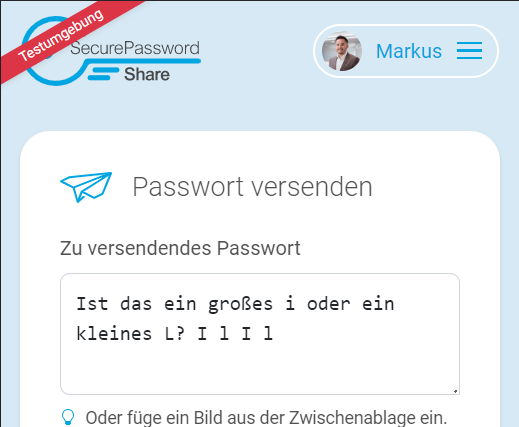
The text area for entering a password or secret is deliberately kept in the serif font "Consolas" to avoid the quote "Is that a small L or a capital i?" mentioned at the beginning of the blog post:
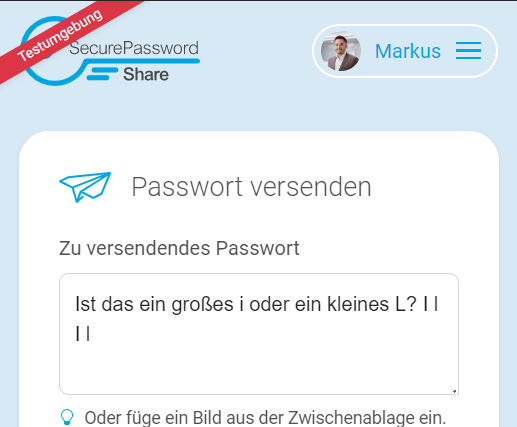
However, if "Arial" were set, the same input would look like this:
More information about Secure Password Share