
- ReadabilityTexts should be clear and easy to read.
- UsabilityWebsites should also be operable without a mouse, e.g. only with the keyboard.
- CompatibilitySupport for assistive technologies such as screen readers.
- ComprehensibilityInformation and operating elements should be easy to understand.
- CustomizabilityCustomization options for different needs, such as contrast settings or text sizes.
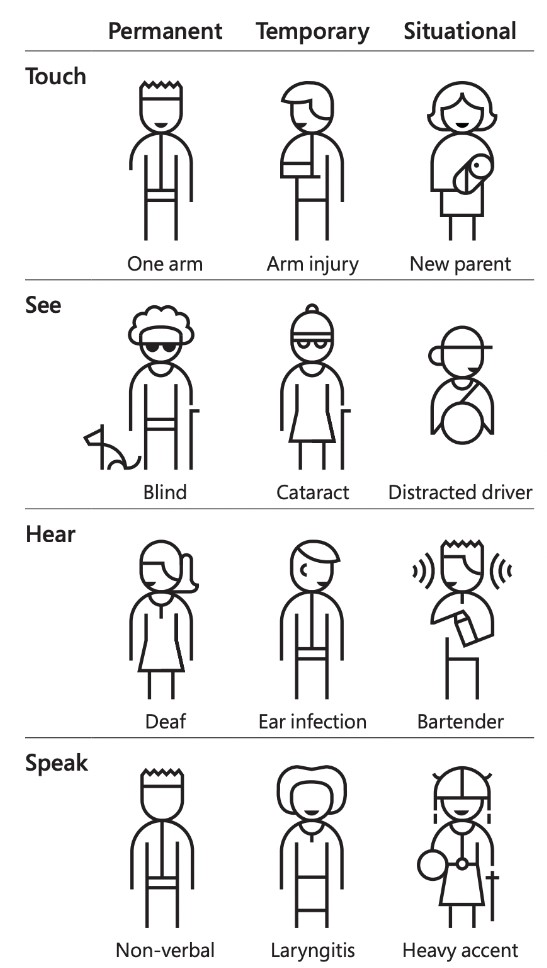
In short: accessibility means that no one is excluded from using the system, regardless of individual abilities or limitations.
What standards, guidelines and laws are there with regard to accessibility?
There is a basic European standard EN 301 549 and a EU Directive 2019/882. In Germany there is also the Accessibility Reinforcement Act (BFSG)which will come into force on June 28, 2025. But what exactly does this mean?
EN 301 549
EN 301 549 is a European standard that defines the requirements for the accessibility of information and communication technologies (ICT). These include requirements for usability, comprehensibility and compatibility with assistive technologies such as screen readers.
This standard has been in force since 2014 and is primarily aimed at public clients in the European Union. This includes state institutions, authorities and other organizations that publicly financed become accessible. This means, for example, that a state institution is obliged to make (web) applications fundamentally "accessible".
Which sector is of interest is the medical sector. Healthcare facilities, especially state or publicly funded hospitals and healthcare services, are also considered public institutions and are therefore covered by EN 301 549.
EU Directive 2019/882
EU Directive 2019/882, known as the European Accessibility Act, aims to improve the accessibility of products and services in the private sector. It sets out specific accessibility requirements for a range of products and services. These include e-commerce, banking services, e-books, electronic devices and certain online services.
This policy applies to companies and organizations in the private sectorthat offer the products and services listed in the directive.
Accessibility Reinforcement Act (BFSG)
The Accessibility Reinforcement Act (BFSG) transposes EU Directive 2019/882 into national law. The law will come into force on June 28, 2025. This means that from this date, companies must ensure that applications that fall under EU Directive 2019/882 are also accessible.
When does the law say you are accessible? How can this be checked?
Basically, you can say that you have met the requirements if you have reached level AA according to WCAG (List of all criteria).
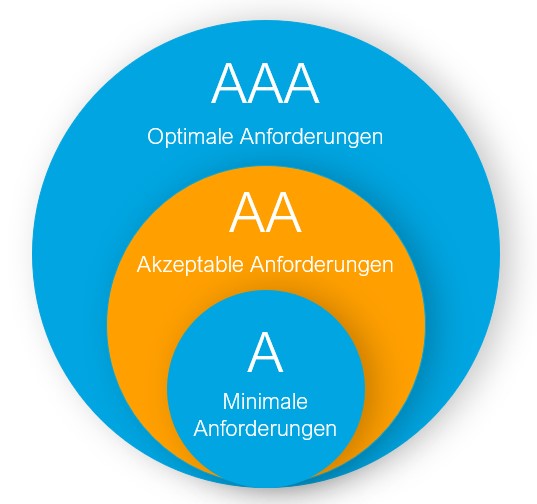
In the following visualization you can see how the levels are built into each other. Level AA contains all the requirements of Level A and Level AAA contains the requirements of Level A and Level AA.
Source: Own representation
Level A: Minimum requirements
- All images must be described so that they are also accessible to users with visual impairments.
- All multimedia content (e.g. audio or video content) must have subtitles or transcripts.
- The website must be able to be navigated using the keyboard so that users without a mouse can also use it.
- The website must not contain any content that could trigger epileptic seizures.
Level AA: Acceptable requirements
- The contrast between the text and the background must be sufficient so that the text can also be read by users with visual impairments.
- The website must be easy to navigate and understand so that users with cognitive impairments can also use it.
- The website must not have any automatic distractions (e.g. videos that play automatically) that could irritate users.
Level AAA: Optional requirements
- All texts on the website must be available in different languages so that users with different languages can also understand the content.
- The website must be designed in such a way that the user interface can be adapted to the individual needs of the user, e.g. by adjusting the font size or colors.
- The website must not have any moving content that cannot be deactivated so that users with attention disorders or autism can also use the content undisturbed.
Other points that are guaranteed:
- Text alternatives for mediaImages and non-textual content must have clear and precise text descriptions in order to be interpreted by screen readers.
- Sophisticated color designThe color design must be such that it is also understandable for people with color vision deficiencies or color blindness and offers sufficient contrast.
- Comprehensible contentThe text on the website must be clear and understandable to ensure that it can be easily interpreted by different user groups.
- Keyboard accessibilityAll interactions on the website must be navigable and operable via the keyboard without having to rely on the mouse.
- Focusable elementsAll interactive elements must be focusable with the keyboard so that users can easily recognize and select them.
- Pause and stop contentMoving or automatically updated content must be pausable or stoppable to give users time to read or interact.
- Navigation structuresThe website should have a clear and consistent navigation structure to make it easier for users to find their way around.
- Prevent input errorsWeb forms should help users to avoid input errors and support them in making corrections.
- Clearly understandable links and buttonsLinks and buttons should have clear and descriptive names to clarify their purpose.
- Robust technologiesThe website should be developed in such a way that it works robustly on different platforms and with different assistive technologies (such as screen readers).

I want to make my (existing/planned) product accessible. What does that mean?
Many people are familiar with the term "mobile first". This is a fundamental concept on the web, whereby an application is first designed and developed for mobile devices and only then is the tablet or desktop version taken care of. This is actually a standard and should always be used as the basis for projects. A few years ago, this concept didn't exist and only desktop applications were developed. Until mobile devices came along and it was then said "we have to become responsive - ASAP and it shouldn't cost much" (which of course wasn't easy in most cases and cost a lot of time and money). The same was then done for (unit) tests etc.
Accessibility will work in exactly the same way. In 100 % of the cases so far it has been "we don't need it, we'll do it later". Later means that it will be a very expensive and time-consuming undertaking in which the application is redesigned by hook or by crook so that it just about meets the requirements.
Accessibility must already be part of a project during the conception phase. Not only do points such as colors and contrasts have to be determined here, but also decisions such as: "How should the user journey be for people who can only use the keyboard?" or "How should the user journey be for blind people?" have to be made. These questions can be very relevant from a UI/UX perspective, as they can have a massive impact on a design.
This means that the topic of accessibility should be discussed as early as possible for projects that are in the planning stage and integrated if necessary. For existing projects, you have to bite the bullet and design accessibility and then implement it accordingly. The more complicated and extensive the application, the more extensive the conversion will naturally be (like responsiveness in the past).
The earlier you think about accessibility, the easier it will be to implement. The exact figures vary from project to project, but they are definitely better than "we don't need it, we'll do it later".
Our assessment of accessibility and barrier-free access
Accessibility is not only very important from a social point of view, but (can) also become legally binding. Accessibility will become increasingly important in the future of web development and we need to think about it during the design phase in order to develop efficiently and cost-effectively.