Initial Situation
Our customer already had a centralized user management system. Their goal was to provide their customers a seamless experience when switching between their different applications and their new store. They’re using an Azure identity provider (IDP) to realize that.
commercetools is a headless commerce platform. The platform is built on top of the MACH stack. MACH stands for:
- Microservice
- API-first
- Cloud-native
- Headless
All those principles help to make it very flexible. Additionally, their product offers a great API documentation.
Get your users into commercetools
In the first step we had to think about a way to sync users into commercetools. Unfortunately, there is no SCIM connecter which would have made this undertaking any easier. Instead, we built a custom connector. Due to the API-first nature and the microservice approach of commercetools, it felt like their intended solution. User and groups are modelled as customer and customer groups in commercetools. At the moment, only one customer can be part of a group, but that was sufficient for our use case. There are different ways to use the groups, but we used them to represent the role of the user.
{
    "key": "<unique-identifier-from-JWT>",
    "customerNumber": "CR007",
    "email": "john.doe@example.com",
    "firstName": "John",
    "lastName": "Doe",
    "authenticationMode": "ExternalAuth",
    "customerGroup": {
        "typeId": "customer-group",
        "key": "user"
    }
}
If you take a similar approach to ours, you should take yourself some time to think about the right “key” for creating your customers. This will help you to access your customers easier. The Azure IDP returns an access token in the JWT format and one information in it is an unique identifier of the user. We’re using this identifier as the keys for our customers in commercetools.
Another important detail is shown in the request above. In line 7 you can see the attribute “authenticationMode” set to “ExternalAuth”. This is necessary if you want to use an external authentication for your customer.
Our custom connector does not only create but also update customers if necessary.
The external auth flow
The commercetools documentation provides a good overview of how to use an external auth. One important information is that it will affect your performance, another one is that commercetools is using the OAUTH2 introspect endpoint and it should take less than 500ms to respond.
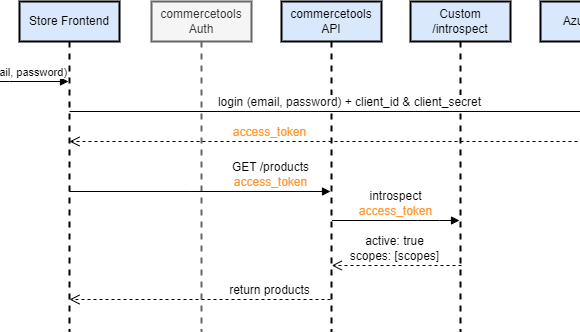
At this point we were facing two issues. The Azure IDP didn’t support the introspect endpoint and if it had, it would have had to return the scopes that the commercetools api understands. We solved those problems by implementing a custom /introspect endpoint.
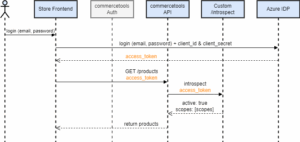
The diagram above shows an example of how our solution works: First the user logs in and the Azure IDP returns an access token. This access token is then used to retrieve products. Calling the products endpoint is just an example and it works the same way for all other endpoints as well. When the commercetools API receives the request, it needs to validate the access token. It normally does that using the commercetools auth server but since we configured commercetools to use the external auth, it requests our custom introspect endpoint. Our custom introspect endpoint checks whether the access token is valid or not and which scopes are assigned to the user. If the access token is valid and the user has the right permission the commercetools api will return the requested products. Otherwise, it will return an error.
Integrating commercetools with your existing user management system is easy
I hope this post showed you how easy it is to reuse to connect commercetools with your existing user management and it gave you some ideas how to solve the problems that might occur when you try to connect yours. Feel free to reach out if you have any questions about our solution.