
How does the interaction between WOPI (Web Application Open Platform Interface) and the Cloud Storage Partner Program (CSPP) work? What challenges are there and what best practices help you to overcome them?
In this blog post, we provide you with answers to all these questions. You will receive a step-by-step guide to integration, technical insights and our practical experience.
What is the CSPP?
The Cloud Storage Partner Program (CSPP) is a Microsoft program that enables third-party cloud storage services to easily integrate with Microsoft Office on the web. Through CSPP, providers can use WOPI (Web Application Open Platform Interface) to edit and view Office documents directly from the cloud. This ensures secure and efficient collaboration within external cloud storage solutions. How does the process work?
- Application and access to the test environment: Once your application for the CSPP has been successful, you will be given access to the test environment.
- Subdomain release: Your application must be accessible via a suitable subdomain that is released.
- Development and testing: You can develop and test the integration in the CSPP test environment.
- Review and production environment: After completion, a review is carried out by Microsoft. If successful, the system is released for the production environment. Note: The entire process can take up to four weeks.
What is WOPI?
WOPI (Web Application Open Platform Interface) is the protocol provided by Microsoft that enables communication between Microsoft Office on the web and the applications of CSPP partners. A WOPI integration consists of three main components:
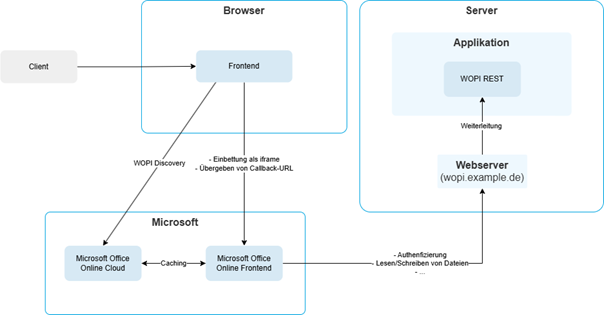
- WOPI Discovery
WOPI Discovery provides the necessary information so that applications such as Microsoft Office can be integrated smoothly on the web. Microsoft provides XML data for this purpose, which includes all available actions for supported file types. Links to Favicons and URL templates for embedding Office applications can be found here. - WOPI REST endpoints
REST endpoints are at the heart of the integration. In order for Microsoft Office to be able to access files on its own server on the web, specific REST endpoints must be implemented that Microsoft prescribes. These endpoints cover typical file operations (CRUD), but specific requirements such as locking (locking files), versioning and authentication must also be implemented. - Embedding Microsoft Office on the web
To display documents in an application, the appropriate application (e.g. Word, Excel or PowerPoint) is embedded in an iFrame depending on the file type. WOPI Discovery helps to select the correct application. Parameters such as the file ID are transferred as URL parameters so that Microsoft Office can load the file directly on the web.
Technical details on integration
The successful integration of Microsoft Office on the web requires a deep understanding of the underlying concepts. The following core aspects were particularly important in our implementation:
- Authentication
A token endpoint is required so that Microsoft Office can authenticate itself to the application on the web. On the first call, Microsoft Office retrieves a token on the web, which is then used for all further requests. The application validates this token and checks the authorizations to ensure that only authorized users have access to the respective files. The token is user-specific and must match the authorizations from the CheckFileInfo endpoint. An expiration date for the token is also important to ensure that no expired requests are processed. - Versioning
WOPI requires the files to be versioned so that the current version number is always supplied when they are retrieved. This number is incremented with every change. Microsoft Office on the web uses it for collision detection - so conflicts can be avoided if several users are working on a file at the same time. Another advantage: previous versions can be restored if required. - File locking (Locking)
To avoid data conflicts, Microsoft Office locks a file on the web as soon as editing begins. A valid lock ID is required to edit a file and is sent and checked each time the file is changed (via the PutFile endpoint). It is important that your own application also observes the lock so as not to mistakenly overwrite a locked file.
Challenges during implementation
- Error analysis
Debugging options are limited with WOPI integration, as Microsoft Office only accesses shared domains on the web. A remote debugging setup can be helpful here. Microsoft Office also only issues generic error messages on the web - a problem that Microsoft's WOPI Validator partially solves by testing different scenarios and checking the endpoints for consistency. For more in-depth analyses, it is also advisable to implement detailed logging in order to be able to trace the sequence and details of the interface calls. - Locking
Although locking is standard in many file management solutions, it can have negative effects if a locking mechanism already exists. For example, background processes that also process files can be blocked by WOPI locking. We have therefore implemented a separate locking mechanism for WOPI: The locks and associated file IDs are stored in a map. A task monitors the expiry times and cleans up expired locks. - Consistency and transactionality
A robust WOPI implementation requires both consistent and transactional interfaces. This means that an endpoint should always return the same result for the same parameters, which is also checked by the WOPI validator. Transactionality is also crucial: as soon as an endpoint returns a response, all changes must already be permanently saved. In our case, an asynchronous process that updated a file again after the query was completed led to problems, as consistency could not be guaranteed.
Conclusion
A CSPP implementation may seem straightforward at first glance, but there are some hidden challenges. It is therefore worth reading and understanding the documentation carefully in advance. An analysis of your own application should also be carried out in order to identify potential problems at an early stage. The implementation should then be encapsulated from the rest of the application as far as possible.1