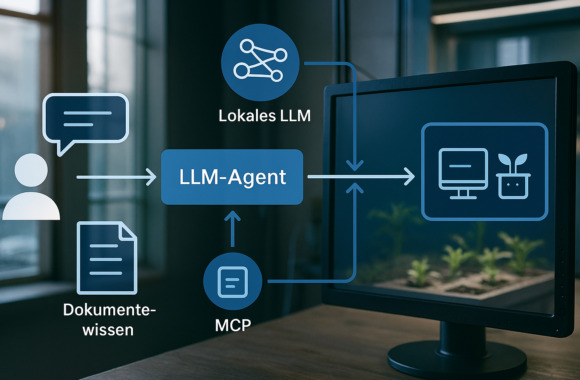
How do you get a Large Language Model to access your IoT data live and combine specialist knowledge from documentation? We tried it out - with two approaches: First with LangChain4J and Ollama, and then with DAIA. In this article, we show you what works in practice, what challenges can arise and how DAIA already solves many of them.
What can the agent do?
The best way to show it to you is directly in the demo: Our agent has been transformed into a Vertical farming showcase embedded. It displays data from a hydroponic device and answers questions about it in natural language. Two variants in comparison:
- Own developmentThingWorx + Ollama + LangChain4J + MCP
- With DAIAThingWorx + DAIA + MCP
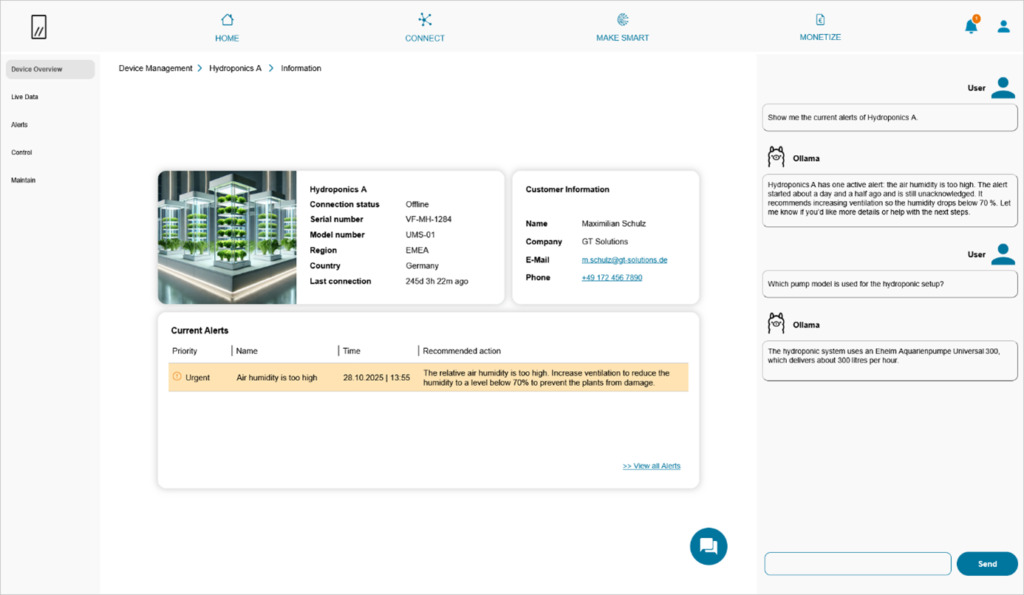
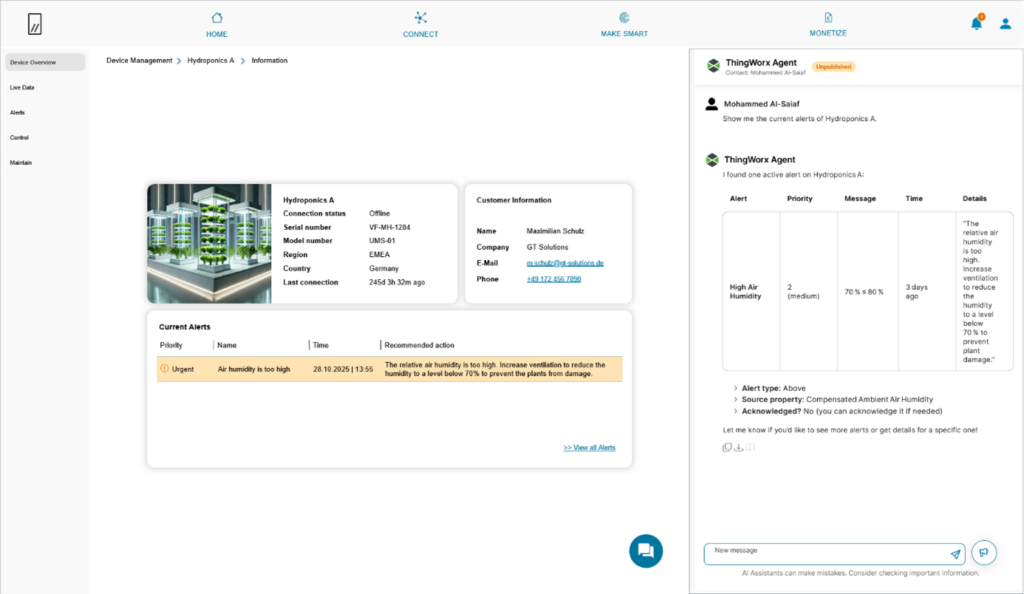
Our goalAn agent that answers technical questions in everyday language - with access to live data from our IoT systems and knowledge from documents such as operating manuals. This allows you to find relevant information without any manual searches or technical terms.
Example questions are:
- Current data: "Show me the current alarms of hydroponics system A?"
- Document knowledge question: "Which pump is used in the hydroponics setup?"
This is how we implemented the agent technically
The picture shows the technical overview of both variants
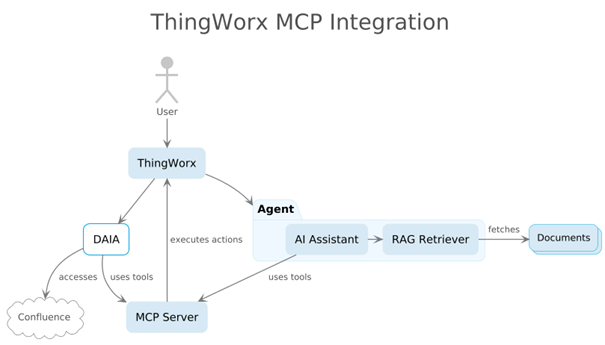
Technical details
1. LangChain4J + Ollama + MCP
- Local LLM (e.g. gpt-oss:20b) via Ollama
- RAG for document knowledge (local vector store) From PDF files. (for more information about Ollama see also here.)
2. DAIA + MCP
- Local LLM (e.g. gpt-oss:20b) via Ollama
- RAG for document knowledge (local vector store) from Confluence
For both, we used a self-created MCP server for ThingWorx access that addresses the ThingWorx REST API.
Example: Agent with LangChain4J
The agent offers a REST endpoint that receives the user's request:
@GetMapping("/chat")
public String chat(@RequestParam String question) {
return agent.chat(question);
}
The agent orchestrates the model, RAG and MCP:
AiServices.builder(Agent.class)
.chatModel(chatModel)
.contentRetriever(retriever) // RAG
.toolProvider(mcpToolProvider) // ThingWorx-MCP
.build();
Why MCP? Our own ThingWorx MCP
MCP (Model Context Protocol) makes tools cleanly writable and findable. We have developed a small MCP server with Spring AI for ThingWorx that encapsulates property accesses, among other things:
@Component
public class PropertiesTools extends BaseToolService {
@Tool(name = "getPropertyValue",
description = "Returns the value of a property from a Thing.")
public String getPropertyValue(
@ToolParam(name = "thingName") String thingName,
@ToolParam(name = "propertyName") String propertyName
) {
return thingWorxApi.getPropertyValue(thingName, propertyName);
}
}
Advantages at a glance:
- Tools are clearly described (parameters, returns)
- The agent detects released tools at runtime
- Several systems (e.g. several ThingWorx instances) can be integrated in parallel
- Calls are traceable and auditable
We link the code and documentation here so that you can rebuild it:
Next Steps
We reached the current status quite quickly. There is room for improvement in some areas. Among other things:
- Authentication: Request with user context (currently a technical account is used)
- Improve system prompt (Prompt Engineering)
- Caching: Cache frequent document passages and stable live reads (already implemented on a trial basis).
- Improving ThingWorx MCP: What are the best practices? How granular should the tools be?
- Automatically provide context: For questions on a Thing detail page, the associated Thing name should be automatically recognized and embedded in the request.
- Execute remote services securely: The chatbot can control machines via ThingWorx, with clearly defined security mechanisms and access controls.
Our findings
- You can run the entire setup on-premise
- Developing your own MCP server was surprisingly easy
- You understand the architecture and can optimize it in a targeted manner
- DAIA brings many best practices and company features directly with it.