
ThingWorx 10 has been available since June - and we have tested the new features for you. In this article, you'll find out what you'll notice during the upgrade, what new features you can expect and what you should look out for.
Upgrade to ThingWorx 10: Problem with extension import
After starting ThingWorx 10, the following error occurred when importing extensions: "EXCEPTION trying to load [file:/....jar] with URLClassloader.addUrl". The cause was the import of extensions with .jar files. The solution was to set additional JVM parameters in the CATALINA_OPTS in Tomcat.1
At first glance, everything remains the same - but a look under the hood shows that ThingWorx 10 comes with some really useful new features.
Discover the new features of ThingWorx 10
ThingWorx 10 comes with some exciting new features - from debugging tools to new IoT stream functions. We introduce you to the most important features.
JavaScript Debugger: Finally debugging services like in the IDE
The new JavaScript debugger (currently still a beta feature) brings real debugging functions to ThingWorx: you can set breakpoints in services, analyze the call stack, view variables and evaluate expressions - similar to common IDEs. In our example, Thing1.Service1 calls the GetExclamationMark service from Thing2. A breakpoint is set here:
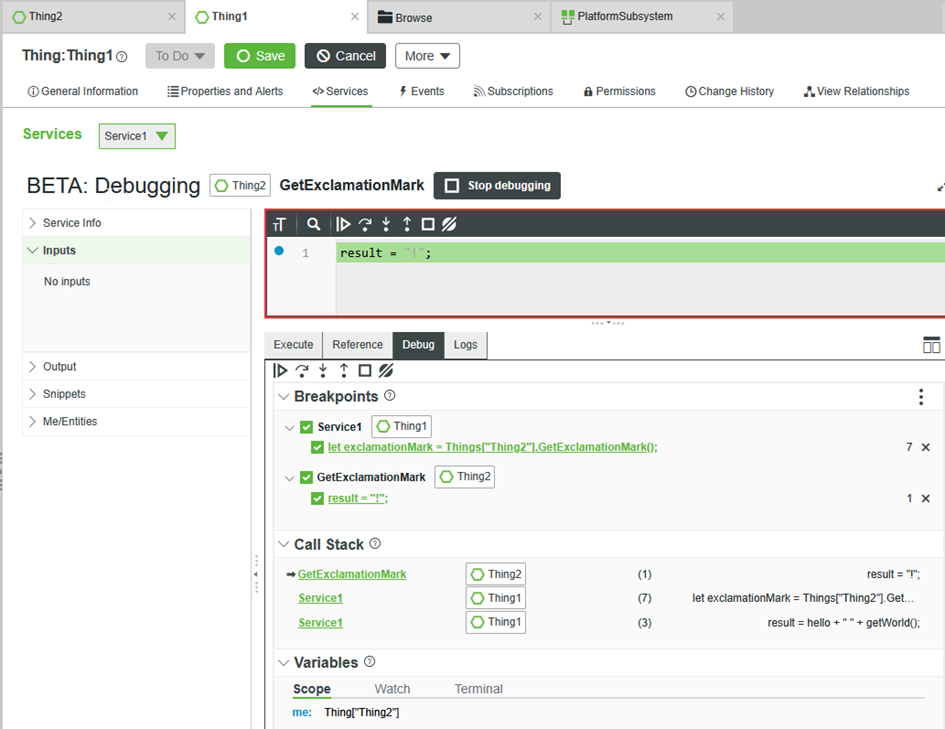
Good to know:
- Each user has their own breakpoints
- Services must be executed with "Debug"
- Breakpoints only apply to the respective ServiceCall that was started with Debug. The rest of the platform is not affected by this.
- Some of these limitations are to be fixed with version 10.1 (e.g. currently no InfoTable variables can be inspected)
- In ThingWorx 10.1, the debugger will also no longer be a beta feature - currently planned for December 2025.2

IoT Streams & Durable Queues: How to process your data more robustly and flexibly
With the new IoT Streams feature, you can stream property values directly to an external messaging system such as Apache Kafka or Azure Event Hub - without having to develop your own mechanisms for processing the data. Previously, this usually required one of the following approaches: either custom services were created or regular SQL queries were executed on the production database - both of which generated additional load.
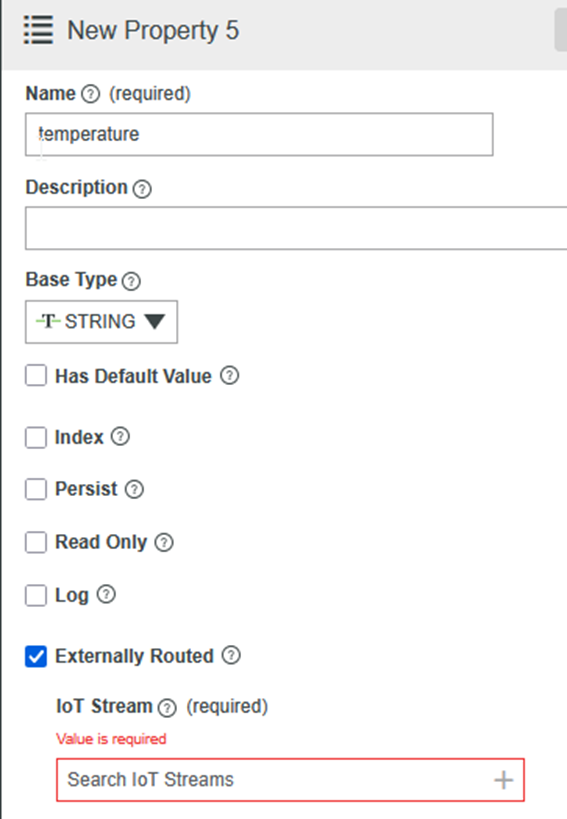
The configuration takes place directly at property level. As you can see in the following screenshot, simply activate the "Externally Routed" option and then select an available IoT stream.
The same mechanism can also be used for ThingWorx internal queues - via the new "Internal Durable Queue"3. Previously, events were stored in volatile in-memory queues such as EventQueues and ValueStreamQueues. In the event of a platform crash, all events contained therein were lost.
With the new Durable Queues, events are first transferred to Kafka, buffered there and then processed in batches. This significantly increases the platform's reliability.
In the following diagram, you can see how ThingWorx can process both external streams and internal queues via Kafka or Azure Event Hub.
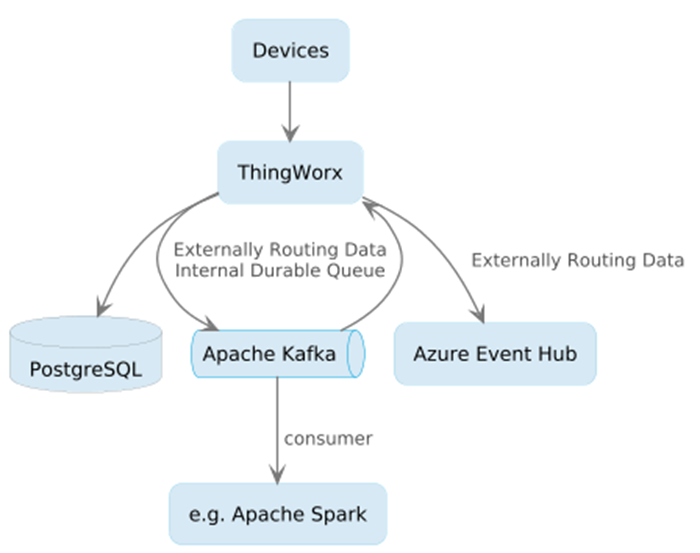
Streaming engines such as Apache Spark, for example, can be used as consumers. For more information on this combination, I recommend the article Processing IoT data efficiently - are Kafka and Spark the answer?
Please note: The use of IoT streams requires a Additional license required. In the future, Java extensions could also be used to Own stream implementations can be connected.4
Cache Thing: Save temporary data without your own logic
With the Cache Thing, ThingWorx 10 offers a new way of efficiently caching temporary data - without having to write your own caching logic. The concept is similar to a DataTable, but is specially designed for fast access and short lifetimes. How to set up a Cache Thing:
- Create a Thing based on the CacheThing template
- Link a DataShape with a defined PrimaryKey
- Configure the parameters: Maximum Cache Size, Expiration Policy and Expiration Time.
You use this thing with services like:
- PutEntry
- GetEntry or
- DeleteEntry
During operation, you use GetEntry to check whether a value is already in the cache. If not, you execute the computationally intensive service, save the result with PutEntry - and it is immediately available the next time it is accessed.
You can delete entries using DeleteEntry.
In addition, metrics are automatically provided for each Cache Thing, which you can use to analyze cache misses, for example.
Technical updates: New basis with Java 21, Tomcat 11 and PostgreSQL 16
ThingWorx 10 also comes with some important technology upgrades under the hood that you should keep an eye on for your environment:
- Java 21: The change from javax.* to jakarta.* may require you to recompile your existing Java extensions.
- Tomcat 11: The application server upgrade brings more security and performance - but also changed configurations.
- PostgreSQL 16: New database version with performance improvements and extended SQL functions.
That was an overview of the most important new features. For a complete list of all features - including new widgets - we recommend the official release notes.5
Our conclusion: Is it worth upgrading to ThingWorx 10?
Yes - even if the number of new features is manageable, they offer real added value in everyday life.
The JavaScript debugger, the IoT streams and the Cache Thing in particular can significantly reduce development and integration efforts.
Support for ThingWorx 9.7 runs until the end of 2026. Use the time to weigh up whether a switch is worthwhile for you - and plan your upgrade early.