Software projects that use SVN as a version control system and have a modular structure benefit from managing individual modules together under a parent repository. In SVN, it is therefore not uncommon to use a project structure that enables a clear separation of the modules.
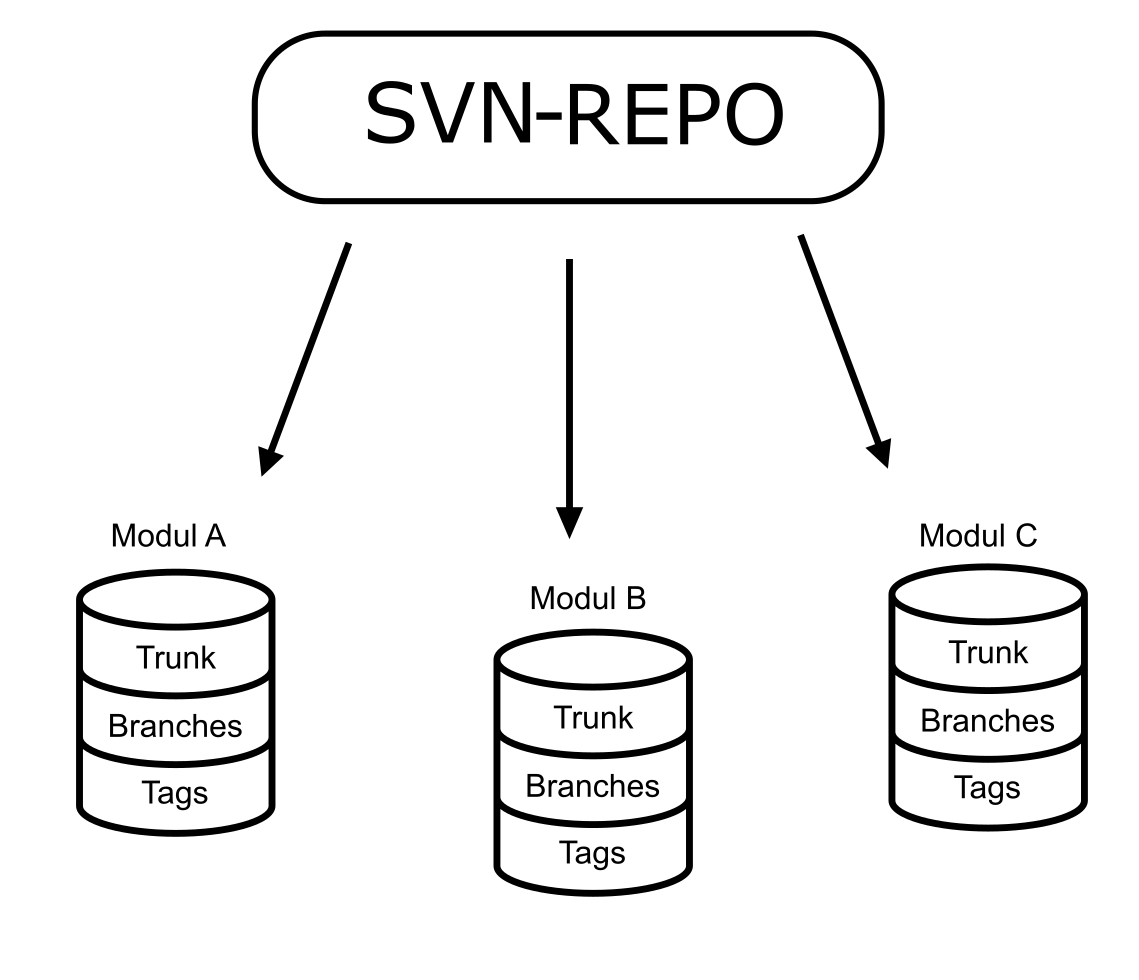
This structure offers particular advantages when components are published separately. For example, a bugfix can be rolled out in "component1" without having to republish the entire project. The CI/CD pipelines of such projects are specially designed for this structure. A planned migration from SVN to Git then presents the project team with a challenge. They have to map the structure in Git without incurring high costs for the conversion of the project and the CI/CD pipelines.
A simple solution is to maintain the modules as separate repositories, but this is not very scalable. If a project comprises several hundred modules, joint administration must be possible in some form.
Git offers two tools that can solve this problem: Git Submodules and Git Subtree. The Git developers do not describe these tools directly as aids for modular repositories. However, both provide the necessary functions to maintain the modular structure and enable shared administration.
Both Git Submodules and Git Subtree are based on independent repositories for each module. The independent repositories allow developers to take advantage of module-based publishing.
Differences between submodules and subtree
At first glance, the tools appear to be very similar, but there are fundamental differences, especially in terms of handling. Git Subtree is characterized by the fact that the parent repository contains the entire code of the modules. This means that the repository works like a normal Git repository in everyday use. In contrast, Git Submodules only stores a reference to the repositories of the individual modules, which developers must take into account in their daily work. Although the code of the repositories is stored locally under the parent repository, the remote repository only contains the references of the module repositories.
The necessary commands can be found in the Git documentation or in many other sources. The biggest difference in operation is that with Git Subtree, the changes are committed to the parent repository and the individual modules are synchronized as required. Whereas with Git Submodules, the changes are checked into the module repositories and only the commit reference is updated in the parent repository. For operation, this means that with Git Subtree you have to create branches from the parent repository in your repository, which then contain all modules. This is not possible with Git Submodules, where you have to create separate branches for each module. Depending on the project environment and the chosen working method, it may be more advantageous to branch the entire repository or only create individual branches.
Third-party solutions
In addition to the native Git approaches, there are also external solutions. For example, Git X-Modules from TMate Software. However, this solution is subject to a fee and is based on external servers, which can be an exclusion criterion depending on the project.
Monorepo
In a monorepository, all modules are located directly under one repository, without a separate repository for each module. This approach has the great advantage that there is no overhead due to the use of additional tools. In most cases, this is the best solution when setting up a new project or when it is possible to economically revise the CI/CD structures and the release process.