Google Stitch in 5 points
- Create UI designs in a flash using text or sketches
- Use 300 free credits daily
- Export HTML or use Figma & Co. directly.
- Works without design know-how
- Perfect for MVPs, app ideas & feedback loops
What is Google Stitch and what can the AI tool do in UI design?
Imagine you have a brilliant app idea but no design team. No problem! Google Stitch transforms your words into vivid app screens in no time at all - for web or mobile. And it's even free of charge.
The AI tool originates from the Google Labs and is a beta project that generates complete user interfaces from simple text - fast, consistent, visually attractive.
Sounds like marketing blah-blah? I thought so too. Until I tried it out.
Why is Stitch a productivity booster?
Google Stitch is not just a tool for designers. It's also valuable for developers, founders and product managers - anyone who wants to know quickly whether their idea will work visually, as many pitchable ideas die from a lack of visualization.
Maybe you know this:
You have a good app idea. You can explain it. But you can't show it. Without screens, there is no feedback. Without feedback, there is no momentum. And without momentum, the idea dies.
Google Stitch solves precisely this problem.
How does Google Stitch visualize your idea?
For the first time, I used Stitch to visualize ideas that I'd had in my head for a long time. Things that previously only consisted of notes suddenly became real screens: Dashboards, detailed views, navigation. Within a few minutes, I could see whether my thoughts also felt good as an interface and that's exactly what took several of my ideas to a new level.
Google Stitch: The AI tool for lightning-fast UI designs
For example, you write:
„A fitness app where users can plan their workouts and see their progress.“
And Stitch creates several matching app screens from this:
- Dashboard
- Training planner
- Active workout
- Progress analysis
- Exercise library
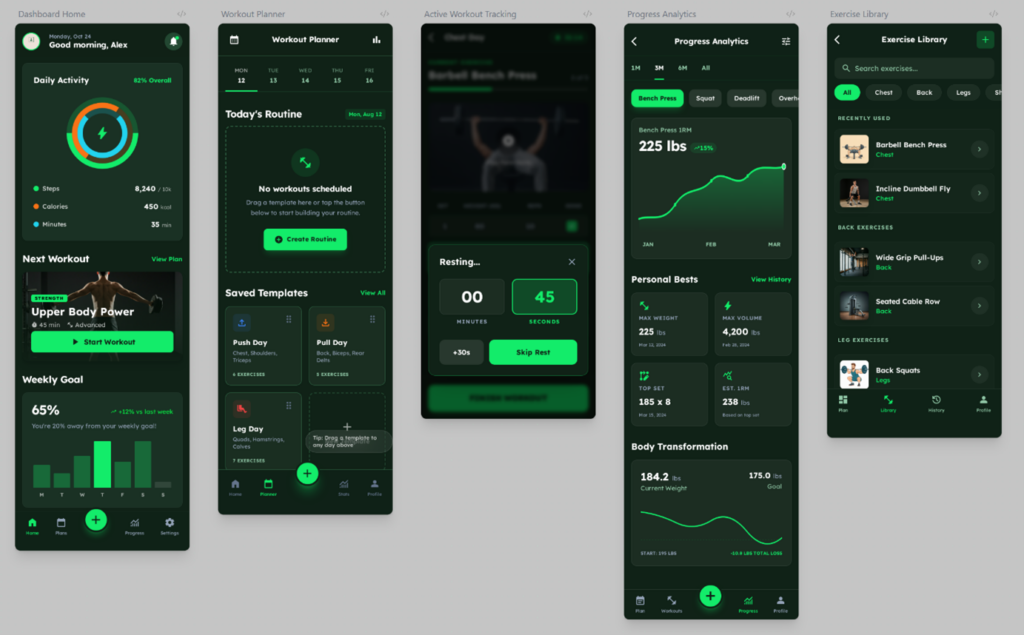
Everything in the same style. Everything visually consistent. And best of all: you don't need any design skills.
Design variants at the touch of a button
A strong point of Stitch is not only the first design. But also what comes afterwards.
You can say:
„Take this screen as a reference and create variants of it.“
And Stitch delivers:
- Other layouts,
- other color palettes,
- other UI approaches.
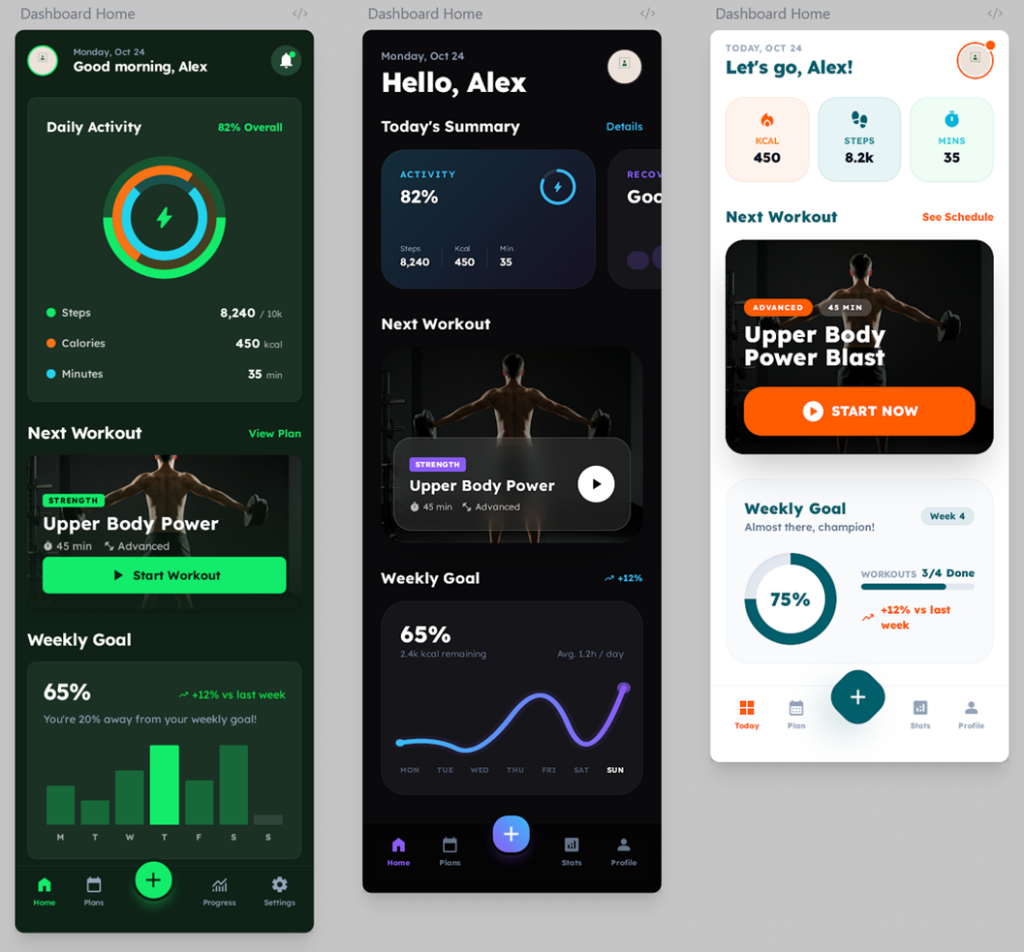
This allows you to compare in minutes what would otherwise take hours - a goldmine for quick product decisions. From design to code - without detours
A real game changer: Each screen can be exported directly as HTML.
This means:
You can load it into Cursor, VS Code or another tool, for example
and turn it directly into working code.
Design → Prototype → MVP in one continuous line.
No screenshot hell. No „Can you please recreate this exactly?“.
Free access: This is how much Google Stitch offers
Currently every Google account gets: 300 credits per day - free of charge
That's easily enough for:
- several app ideas,
- many variants,
- real product experiments.
Who is Google Stitch perfect for?
Google Stitch is ideal for you if you:
- have an app idea,
- need visual clarity quickly,
- Want feedback,
- Need feature ideas or inspiration
- or build an MVP.
In short: If you want to create things, it is enough to describe them in words.
Conclusion
Google Stitch closes the gap between idea and interface.
It does not replace a designer:inside - but it gives you Speed, clarity and visual momentum. Test Google Stitch yourself and see how quickly your ideas take shape. I'm excited to see what else this tool will bring as soon as it leaves beta status.
FAQs about Google Stitch
What is Google Stitch?
An AI tool from Google Labs that creates complete UI designs for web and mobile from text or sketches.
How much does Google Stitch cost?
The tool is currently free of charge. You receive 300 credits per day with your Google account.
Which entries are possible?
You can enter text descriptions, prompts or screenshots/wireframes.
What export formats does Stitch offer?
You can export HTML files and process the designs further, e.g. in Cursor or VS Code.
Who is Google Stitch particularly suitable for?
For founders, developers, designers, product owners - in short: anyone who needs quick visual feedback on app ideas.